Open a UDF File on a Mac: UYAP Editor and More
Which UYAP Doküman Editörü build fits your Mac, what to do when macOS blocks it or it asks for Java, and how to read a .udf without installing the editor.
読了目安 4 分
Short answer: yes, a Mac opens UDF files. UYAP publishes UYAP Doküman Editörü for macOS, with builds for Apple Silicon and Intel chips, and the current builds do not ask for Java. If you only need to read the file, the Eddocu Mac app opens it as it is, and the Open UDF File page reads it in Safari or Chrome with nothing installed.
We make Eddocu. It has no link to UYAP or the Ministry of Justice. The editor steps below follow the UYAP download page; the Eddocu steps were tried on a Mac with sample petitions we wrote for the test. For the format itself, read what a UDF file is and how to open it.
Does UYAP Doküman Editörü run on a Mac?
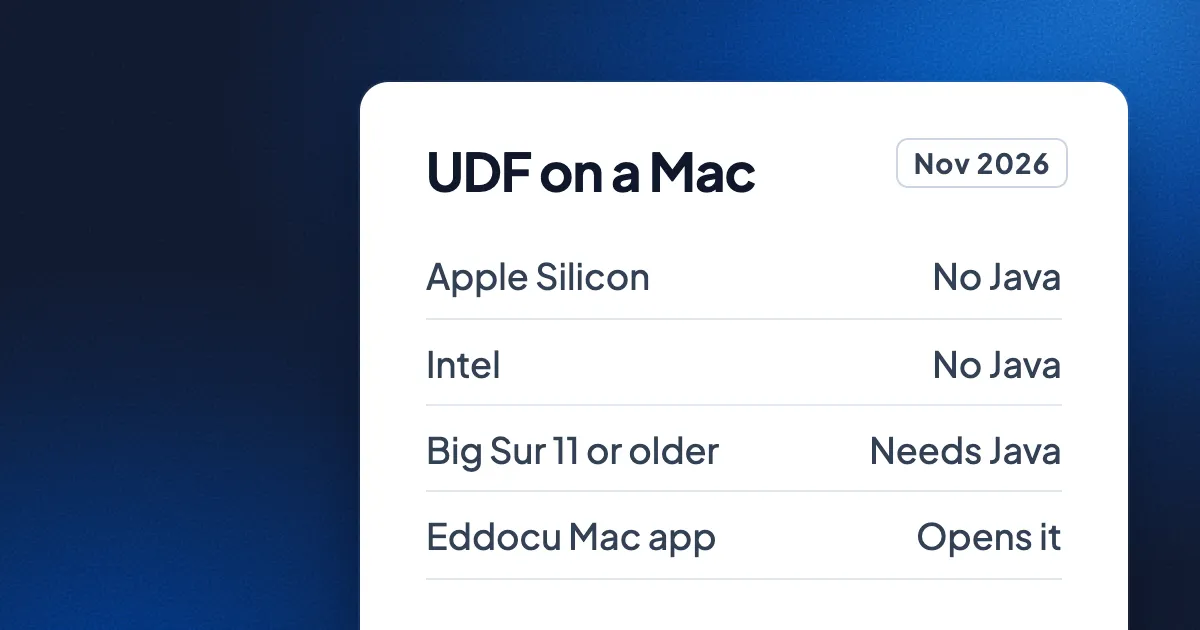
It does. The UYAP Editör page lists three Mac downloads: one for Apple Silicon (M1 and later), one for Intel Macs, and an older one for macOS Big Sur 11 and earlier. Only that last one still depends on Java. Lawyers who tried the editor on a Mac years ago and gave up because of Java errors will find the current builds simpler.
| Your Mac | Build to pick | Java |
|---|---|---|
| Apple M chip, recent macOS | Apple Silicon | Not needed |
| Intel chip, recent macOS | Intel | Not needed |
| Big Sur 11 or older | The older build | Needed |
Install the editor on a Mac
- Open the Apple menu and choose About This Mac. A "Chip" line naming Apple M1, M2, M3 or later means Apple Silicon; a "Processor" line naming Intel means Intel. The macOS version is on the same window.
- Go to the UYAP Editör page on uyap.gov.tr and download the build that matches. Take it from that page rather than from a file someone forwarded you, so you know it is the current one.
- Open the downloaded file in Finder and move the app to Applications, as the installer asks.
- Double-click a .udf file. If macOS asks which app to use, pick UYAP Doküman Editörü. To make that permanent, select a .udf file, press Command-I, choose the editor under Open with and click Change All.
When the editor will not open
- macOS says the app cannot be opened. Gatekeeper blocks apps it cannot verify the first time you run them. Open System Settings, then Privacy & Security, scroll to the message about the editor and click Open Anyway. Do this only for a copy you downloaded from uyap.gov.tr yourself.
- It starts and closes at once, or runs slowly. The build may not match the chip. An Intel build on an Apple Silicon Mac goes through Rosetta and can misbehave; install the Apple Silicon build instead.
- It asks for Java. You have the older build. On a current macOS, remove it and install the Apple Silicon or Intel build rather than adding Java.
- Signing fails while reading works. E-imza needs the card reader and its driver from the provider that issued your certificate, and those drivers have their own Mac versions. Check the provider's site for a build that supports your macOS and chip, or sign with mobile signature (m-imza) instead.
Open a UDF on a Mac without the editor
Most of the time a lawyer, an expert witness or a client only needs to read what the court sent. Three ways do that without UYAP's program:
- The Eddocu Mac app. UDF support is built in, with no add-on to download. Open the file from Finder or drag it onto the app and the pages appear; you can edit and save it again as UDF, Word or PDF. Download it from the download page; the UDF page covers what it does with these files.
- A browser tab. The Open UDF File page reads the file inside Safari or Chrome. Nothing is installed and the file stays on the Mac, which suits a borrowed or locked-down machine.
- Preview, after a conversion. Turn the file into a PDF with UDF to PDF and it opens in Preview like any other PDF, ready to annotate, print or send to someone who has never heard of UYAP.
Convert or make a UDF on a Mac
Pages and Word for Mac do not save UDF. Write the petition where you like, save it as .docx and run it through Word to UDF; a PDF goes through PDF to UDF. Going the other way, UDF to Word gives you a DOCX that Pages and Word both open. Before filing, open the new .udf in UYAP Doküman Editörü, read it once and sign it there, since Eddocu writes unsigned files only.
FAQ
Which build do I need on an M1, M2 or M3 Mac?
The Apple Silicon build. It runs without Java and without Rosetta.
Can I sign a UDF with e-imza on a Mac?
In UYAP Doküman Editörü, yes, as long as your card reader's driver supports your macOS version. Mobile signature avoids the card reader altogether.
Can Preview or Pages open a .udf file directly?
No. Neither knows the format. Convert the file to PDF for Preview or to Word for Pages, or open it in an app that reads UDF.