Open a Keynote File on Windows: View, Edit, Convert
Open a .key file on a Windows PC with Keynote for iCloud, a PowerPoint export or a browser viewer, and what each one keeps or loses.
4 min read
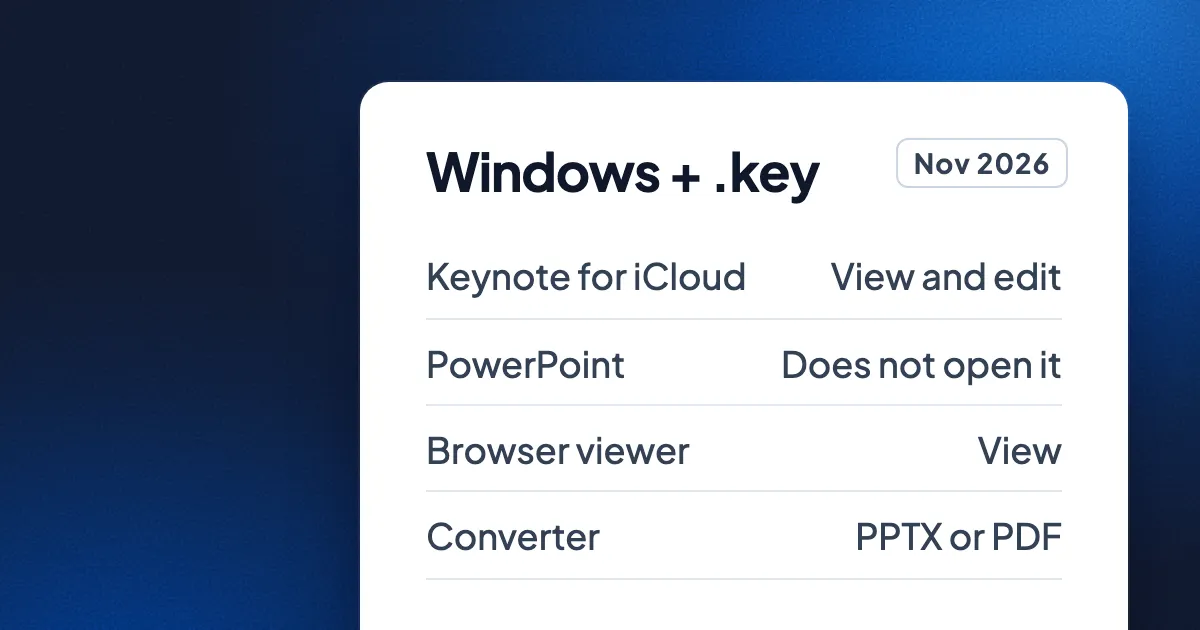
Short answer: Windows cannot open a .key file by itself and neither can PowerPoint. To edit it in Keynote, sign in at iCloud.com/keynote with an Apple Account, upload the file and work in the browser. To look at it or convert it with no account, use a browser viewer such as Eddocu's. If someone else made the deck, the cleanest fix is to ask them to export it as PowerPoint from Keynote.
Eddocu is the editor we make. Its Windows app does not open .key files; only its browser tools do, and they have limits described below.
Ways to open a Keynote file on Windows
| Method | View | Edit | Save as | Account | Main limit |
|---|---|---|---|---|---|
| Keynote for iCloud | Yes | Yes | Keynote, PowerPoint, PDF | Apple Account | Needs a connection and a supported browser |
| Ask for a PowerPoint export | Yes | Yes, in PowerPoint | PPTX | None | Someone needs Keynote |
| Open Keynote File (Eddocu) | Yes | No | PDF, or convert | None | Not for presenting |
| Keynote to PowerPoint (Eddocu) | After conversion | Yes, in any PPTX editor | PPTX | None | Builds and transitions are not carried over |
| Edit Keynote (Eddocu web) | Yes | Text and images | PPTX, PDF | Free account | Cannot save back to .key |
Use Keynote in a browser with iCloud
- On the PC, go to iCloud.com/keynote and sign in with your Apple Account.
- Drag the .key file into the document manager, or click the upload button and pick it.
- Double-click the presentation to open and edit it.
- To get a copy, click the More button, choose Download a Copy and pick Keynote, PDF or PowerPoint.
Apple documents the upload and the download in its Keynote for iCloud guide. The web app runs on a Mac or a Windows device and syncs with Keynote on a Mac, iPhone or iPad that uses the same account. You need a computer to edit, because a tablet can only view files on iCloud.com.
Pick this when you will send the file back to Keynote users. Of the methods here, it is the one that can give you a Keynote file again. The presentation is stored in your iCloud account, so check first if it is confidential.
Ask the sender for a PowerPoint file
On a Mac, the steps in Apple's export guide are:
- Open the presentation in Keynote.
- Choose File, Export To, PowerPoint.
- Set a password if needed, click Save, name the copy, choose where it goes and click Export.
The original is not changed. Keynote on iPhone and iPad and on iCloud.com exports PPTX and PDF too, so a colleague with any of these can do it. Ask for a PDF beside the PPTX; it shows how each slide is meant to look, and you can compare after opening the PPTX.
View or convert the file in a browser
Open Keynote File shows the slides in the browser. The file is read on your computer, with no upload and no account. You can download a PDF or convert from there.
- Keynote to PowerPoint makes a PPTX with the slides, text and pictures. Builds and transitions are not carried over, so check any slide that relied on them.
- Keynote to PDF gives one page per slide. Use it to read, print or send.
- Edit Keynote opens the deck in the Eddocu web editor, where you can change text and images and export PPTX or PDF. It needs a free account, and the file is uploaded to our server and stored in your library.
After converting, look at fonts first. A deck set in a font that is not on your PC is drawn with another one, and lines wrap in new places. Then check charts, tables, grouped shapes and video slides.
A Keynote alternative for Windows
If you are moving from a Mac, choose the program by the format your colleagues use. PowerPoint suits you when they send .pptx, and several free programs edit .pptx offline. Export your old decks from Keynote before you give up the Mac; on a PC you would do it one file at a time through iCloud.
- Presenting with notes on a second screen: PowerPoint, LibreOffice Impress or ONLYOFFICE. Eddocu has no presenter view yet.
- Staying with .key files: Keynote for iCloud.
- Changing text and pictures in .pptx decks and also editing PDFs: Eddocu for Windows works offline and is free for personal use. It imports a .pptx into its own format and writes a new one on save, and complex layouts can shift.
See Keynote and Eddocu and PowerPoint and Eddocu for prices and formats side by side.
Facts checked on 25 November 2026.
FAQ
Can PowerPoint open a .key file?
No. Export the deck to PPTX from Keynote, or convert it first.
Can I install Keynote on Windows?
Apple's format page lists Keynote for iPhone, iPad, Mac and iCloud.com. On a PC you use it in a browser.
Can I open a Keynote file without an Apple Account?
Yes. A browser viewer or converter reads the file without one. Editing in Keynote itself on iCloud.com needs an Apple Account.
Do animations survive the move to PowerPoint?
With our converter, builds and transitions do not. With Apple's own export, check every animated slide in PowerPoint before you present.
Can I save my changes as a .key file on Windows?
Yes, with Keynote for iCloud: download a copy in Keynote format. Eddocu's editor exports PPTX or PDF only.