Gamma Alternatives: Decks You Can Edit as PPTX
Copilot, Plus AI, SlidesAI, Beautiful.ai, Presentations.AI and Eddocu compared on PPTX editing, limits and the price on each vendor page.
5 min read
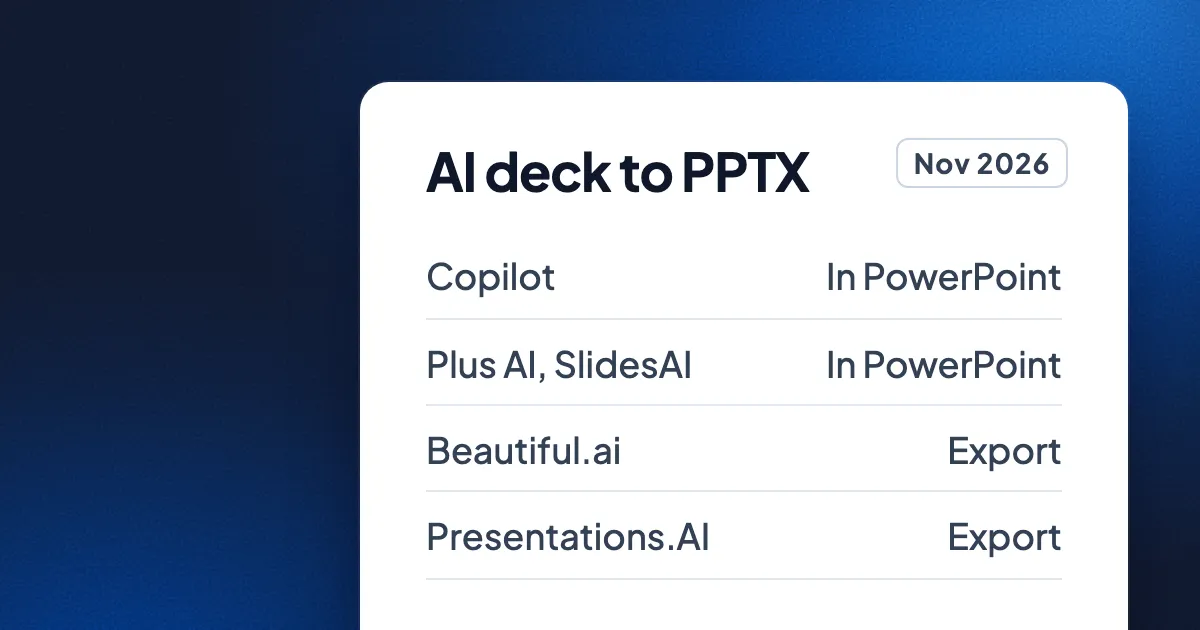
Short answer: if you need a deck you can edit slide by slide as PPTX, start with a tool that writes into PowerPoint or Google Slides: Copilot in PowerPoint if you pay for Microsoft 365, Plus AI or SlidesAI if you use either program. Beautiful.ai and Presentations.AI are separate apps with a PowerPoint export. Eddocu is for the step after that: editing a PPTX you already have, offline.
Eddocu is the editor we make. Generating decks is not what we built it for, so we list it last. We did not test the output of these tools; the facts are from each vendor's pages.
What happens when you export from Gamma
Gamma exports to PowerPoint, PDF, PNG and Google Slides, so an export may be all you need. Its export help page lists what changes in the PPTX:
- The Slide Master is blank, so you cannot restyle the whole deck from one place. Each slide keeps its own styling.
- Tables are editable by default, and rounded table corners become sharp.
- Gradient headings may turn into one color, and frosted backgrounds use a fallback.
- A font weight outside your theme may be replaced by the nearest one.
- Google Sheets charts become static images.
- Speaker notes are included.
- Files from a free workspace carry the "Made by Gamma" badge.
If the blank Slide Master or the badge is your problem, the tools below differ on exactly that point: those that run inside PowerPoint add slides to a PowerPoint file, which keeps its own Slide Master.
The shortlist
| Tool | Where you work | PPTX | Price on the vendor's page | Suits |
|---|---|---|---|---|
| Copilot in PowerPoint | PowerPoint | It is PowerPoint | Microsoft 365 Personal $9.99 a month or $99.99 a year; Premium $19.99 a month | Microsoft 365 subscribers |
| Plus AI | Google Slides and PowerPoint | Inside PowerPoint | Basic $10 a month billed yearly, $15 monthly; 7-day trial | Teams on either program |
| SlidesAI | Web, Google Slides add-on, PowerPoint add-in | Inside PowerPoint | Free, up to 10 slides a deck; Pro $10 a user a month billed yearly | Short decks at no cost |
| Beautiful.ai | Its own web app | Import and export | Pro $14.50 a month billed yearly; 14-day trial | Design rules that hold the layout |
| Presentations.AI | Its own web app | Editable export | Basic $84 a year, Pro $240 a year | Generating in an app, finishing in PowerPoint |
| Eddocu | Apps on every platform, web | Imports and exports PPTX | Free for personal use; AI 100 credits a month, 1,000 on Pro at $9.99 | Editing an existing deck offline |
Copilot in PowerPoint
Open a new presentation, click the Copilot icon at the bottom right and describe the deck. Copilot may ask about audience, length and template, then builds the slides. The help page says it needs Copilot in your subscription and works best with source Word documents under 24 MB. Microsoft's price table gives Personal and Family more use than the free tier and Premium the most. On a shared plan, only the subscription owner gets the AI.
Better than Gamma when your company has a template to follow. Worse when you want a page to publish as a link. PowerPoint compared with Eddocu covers the editor itself.
Plus AI
Plus AI works in Google Slides and PowerPoint. Its pricing page lists Basic at $10 a month billed yearly ($15 monthly) with 1,500 credits, Pro at $20 ($25) with 3,000 and Team at $30 ($40) with 6,000. The 7-day trial includes 1,000 credits and asks for a card, so note the date it ends.
SlidesAI
SlidesAI has a free plan with 200 credits a month and up to 10 slides a deck. Its pricing page puts Pro at $10 a user a month billed yearly, with 20 slides a deck and PDF or Word uploads, and Premium at $20.83 with 50 or more slides. A 10-slide deck costs 105 credits on the Balanced model, so the free allowance covers one such deck with some changes. Unused credits do not roll over.
Beautiful.ai
Beautiful.ai is a separate editor. Its pricing page lists Pro at $14.50 a month billed yearly, a single presentation at $45, and Team at $40 a user a month billed yearly for 2 to 20 seats. PowerPoint import and export are included, and the 14-day trial needs a card. Export one real deck in the trial and open it in PowerPoint before you pay for a year.
Presentations.AI
The pricing page lists Basic at $84 a year, Pro at $240 and Gold at $1,200, all with editable PowerPoint export. Its FAQ mentions a free Starter plan with 400 credits, about 40 slides, and says there are no refunds. Use the free credits first.
Eddocu
Eddocu opens a PPTX on Windows, Mac, Linux, iPhone, iPad, Android and the web. You change text, images and slides yourself, or ask its AI chat to rewrite or translate what is open. The apps work offline with no account; AI needs one. It imports the deck into its own format and writes a new PPTX on save, so complex slides can shift. It has no presenter view and no video export.
It fits after another tool made the deck. To only change the order, use Rearrange Slides; to join decks, use Merge PowerPoint; if you have only a PDF, try PDF to PowerPoint. Gamma and Eddocu has the detail.
How to choose
- You must use a company template: Copilot, or an add-in such as Plus AI.
- You work in Google Slides: Plus AI or SlidesAI.
- You want to pay nothing: the SlidesAI free plan or Gamma itself, with its badge.
- You share a link and never edit in PowerPoint: stay with Gamma. It is built for that.
- You have a PPTX and need to fix it on a plane: Eddocu, or one of the offline PowerPoint alternatives.
Check the PPTX before you commit
- Click a title. It should be a text box you can type in, not a picture.
- Open the Slide Master. If it is blank, changing the font means editing each slide.
- Right-click a chart and look for Edit Data.
- Open the file on a second computer to see which fonts are replaced.
- Check the notes and the last slide for a badge.
Facts checked on 25 November 2026. Prices are in US dollars before tax. Canva and a few others are left out because we could not open their current price pages on that date.
FAQ
Can I edit a Gamma deck in PowerPoint?
Yes. Choose Share, Export and PowerPoint, with All cards selected. Expect the changes listed above.
Is there a free Gamma alternative?
SlidesAI has a free plan of up to 10 slides a deck, and Presentations.AI mentions a free Starter with 400 credits. We could not open Gamma's own pricing page on that date, so check what its free plan includes now.
Which alternative gives a real PowerPoint file?
Copilot works in PowerPoint, so there is no conversion. Plus AI and SlidesAI also work inside it.
Does Eddocu make a deck from a prompt?
It can write new documents from a prompt, which is part of Pro AI at $19.99 a month. We would still pick a tool above for a deck made from scratch: Eddocu's slides are better suited to editing one you already have.