WPS Office Alternatives Without Ads (Android and Windows)
WPS shows ads and keeps full PDF editing for Pro+. Ad-free alternatives for Android and Windows, by formats, PDF tools and price.
Updated 8 min read
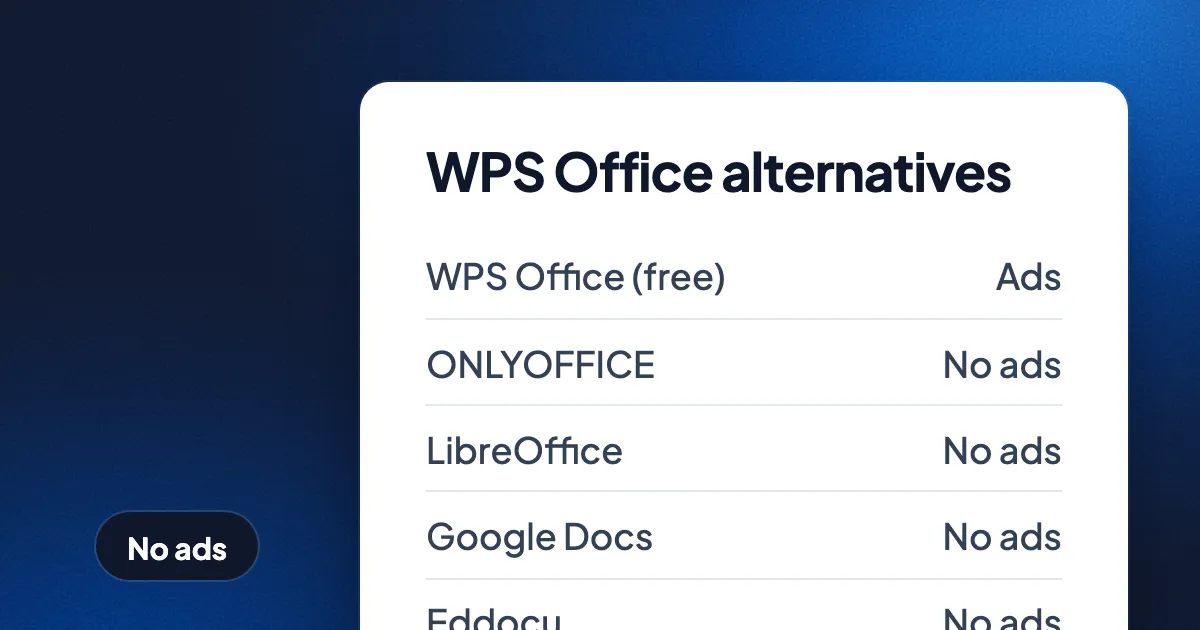
Short answer: the free WPS Office shows ads and keeps full PDF editing, full e-signatures and most templates for WPS Pro+, which WPS prices at $69.99 a year in the US. For an ad-free suite with spreadsheets on Android and Windows, ONLYOFFICE is the closest match, Google Docs, Sheets and Slides suit people who work online, and LibreOffice (with Collabora Office on Android) is the open-source pick. If most of your work is PDFs, Word files and slides rather than spreadsheets, Eddocu edits all three for free, with no ads.
Eddocu is the editor we make, so weigh our section with that in mind. Every price and feature below comes from the vendor's own pages or its Google Play listing.
What WPS Office does well, and where the free version holds back
The Android app has passed 500 million downloads on Google Play, and it is easy to see why. One app holds a word processor, a spreadsheet, a presentation editor and a PDF reader, with documents open side by side in tabs. WPS says it handles 47 file formats and 46 languages, and it ships for Windows, Mac, Linux (as .deb and .rpm packages), Android and iOS, so the same suite follows you from a phone to a cheap laptop. Its DOCX, XLSX and PPTX handling is good enough that many people never notice they are not in Microsoft Office.
The free plan, which WPS calls WPS Standard, is where the friction starts:
- Ads. The Android app's Play listing carries the "Contains ads" label, and WPS's own guide to the free version says you will see ads in the interface. Its article on disabling ads admits there is no switch for them in the Android app.
- PDF limits. The same guide says advanced PDF editing and conversion are capped per day on the free plan. The pricing page lists full PDF editing and conversion, the full electronic signature feature and "No advertising" among the things Pro+ adds.
- Storage and templates. Free accounts get 1 GB of WPS Cloud and limited template downloads; Pro+ raises that to 20 GB and unlimited templates.
- AI with a daily cap, even when you pay. WPS states that Pro+ AI tools stop at a daily usage limit and resume the next day.
None of this makes WPS a bad suite. The free version is simply built to sell Pro+, and in practice the upgrade prompt tends to arrive when you open a PDF you need to change.
The alternatives side by side
| App | DOCX, XLSX, PPTX | PDF tools | Android | Windows | Ads in the free app | Price |
|---|---|---|---|---|---|---|
| WPS Office (free) | Yes, all three | Partly: full editing is Pro+ | Yes | Yes | Yes | Free; Pro+ $69.99 a year (US) |
| ONLYOFFICE | Yes, its native formats | Yes: edit, forms, signatures | Yes | Yes, free Desktop Editors | No ads label on Play | Free apps |
| Microsoft Word, Excel, PowerPoint | Yes, the reference | Partly: Word converts a PDF into a new document | Yes, free on screens up to 10.1 inches | Desktop apps need a subscription | No ads label on the Word app | Personal $9.99 a month or $99.99 a year (US) |
| Google Docs, Sheets, Slides | Partly: opens and exports them | No | Yes | In Chrome or Edge | No ads label on Play | Free with a Google account |
| LibreOffice | Yes, through import filters | Partly: Draw edits PDFs with layout loss | Viewer, editing is experimental | Yes | No | Free |
| Collabora Office | Yes | No | Yes | No (desktop users take LibreOffice) | No ads label on Play | Free |
| Eddocu | DOCX and PPTX; no spreadsheet editor | Yes: edit text, images, pages | Yes | Yes | No | Free for personal use; Pro $9.99 a month |
"No ads label" means Google Play does not mark the app as containing ads. Several of these apps still sell subscriptions or ask you to sign in.
ONLYOFFICE: the closest swap for a full suite on phone and PC
ONLYOFFICE is the replacement that changes least about how you work. Its Desktop Editors for Windows, Mac and Linux are free for personal and business use, and the project describes DOCX, XLSX and PPTX as its native formats rather than something it converts. The ONLYOFFICE Documents app for Android opens the same files, edits text documents and spreadsheets stored on the phone without a connection, and has no ads label on Google Play.
The PDF editor in the desktop app changes text and images, fills and creates forms, and adds passwords and signatures, which covers most of what WPS keeps for Pro+. The trade-offs: the interface is busier than WPS's, the mobile app is at its best when connected to an ONLYOFFICE cloud account, and the optional AI tools need a provider you connect yourself. We compare it with Eddocu in more detail on Eddocu vs ONLYOFFICE.
Microsoft's own apps: when files must look exactly as they do in Office
If the people you send files to use Microsoft Office, nothing matches Office better than Office. On Android, the standalone Microsoft Word app (and its Excel and PowerPoint siblings) edits for free on phones and tablets with screens of 10.1 inches or less, once you sign in with a Microsoft account. Microsoft's newer Copilot hub app does carry the "Contains ads" label, so install the single apps instead.
Windows is the catch. The installed Word, Excel and PowerPoint come with a subscription: Microsoft 365 Personal is $9.99 a month or $99.99 a year on Microsoft's US plan page. Without one you get the free web versions in a browser, with 5 GB of OneDrive storage.
Google Docs, Sheets and Slides: free, online, no ads
Google's editors cost nothing, show no ads and run on any Android phone. On a Windows PC they run in the browser, and they keep working offline if you use Chrome or Edge with the Google Docs Offline extension turned on. Sharing a document and editing it with someone else at the same moment is where Google is strongest.
The price is fidelity. Google opens Word, Excel and PowerPoint files, but a file with tracked changes, complex tables or custom fonts may come back from File > Download > Microsoft Word (.docx) looking different. There is no PDF editor, and everything is tied to a Google account.
LibreOffice and Collabora Office: open source, no accounts
LibreOffice is the free, open-source suite for Windows, Mac and Linux: Writer, Calc, Impress and Draw, with no ads, no account and, in version 26.8, no generative AI by design. It saves DOCX, XLSX and PPTX, though its native format is ODF, so complex Office files can shift. Draw opens a PDF for small fixes, with text split into separate boxes.
On a phone, the Document Foundation offers only an Android viewer with experimental editing. For real editing on Android it points to Collabora Office, a free app built on the same engine, which opens and saves ODF and Microsoft Office files.
Eddocu: when PDFs, Word files and slides are the work
Many people install WPS for one job: changing a PDF. That is the job WPS limits on its free plan, and it is the one we built Eddocu around. You can change the words and pictures already in a PDF, then open a Word file or a deck in the same window, on Windows, Mac, Linux, iPhone, iPad, Android or the web. The apps work offline. Personal use is free with no watermark and no ads; the paid plans add AI credits, imports and storage.
- Edits the existing text, images and pages of a PDF on the free plan, not just a layer on top.
- Opens DOCX and PPTX in the same editor and saves PDF, DOCX, PPTX or HTML.
- Merges, compresses and signs PDFs, and makes scans searchable with OCR on your device; these tools are in beta.
- An AI chat that rewrites or translates in the page, with 100 free credits a month; you accept or reject each change.
- Pro is $9.99 a month or $49.99 a year, if you want more imports, storage or AI.
Start in the browser with Edit PDF, or get the apps from eddocu.com/download.
Where other tools are better than Eddocu
- Spreadsheets. Eddocu has no spreadsheet editor. Its Excel to PDF tool turns a sheet into a PDF, and that is all. If you live in XLSX files, pick ONLYOFFICE, LibreOffice or Microsoft Excel.
- Templates. WPS and Microsoft have large template libraries for CVs, invoices and calendars; Eddocu does not.
- Exact Office layout. Eddocu imports a file into its own format and writes a new one when you save. Dense multi-column pages or unusual fonts can shift, so check the result before you send it.
- Open source and self-hosting. Eddocu is closed source. LibreOffice, Collabora and ONLYOFFICE are open source.
Moving your files out of WPS
- Download anything you keep in WPS Cloud to your phone or PC before you uninstall, so it is a plain file again.
- Look for WPS's own formats. A spreadsheet saved as
.etopens reliably only in WPS: open it there and save it as.xlsx. In WPS Writer, Menu > Options > General and Save has a "Save as default format" setting; set it to Microsoft Word Document (*.docx) for anything you create before the switch, as WPS's own help describes. - Open five of your real files in the new app, including one with a table and one with tracked changes, and compare them with the WPS version before you move everything.
FAQ
Can I use WPS Office without ads for free?
Not officially. WPS lists "No advertising" as a Pro+ benefit, and its own help says the Android app has no setting to turn ads off. Blocking the app's internet access, which some guides suggest, also cuts WPS Cloud.
How much is WPS Pro+?
WPS gives $69.99 a year as its US price and shows local prices in other countries, which it says apply on PC and Android. A sharing plan splits Pro+ between two or more people at a lower price per person.
What is a free WPS alternative for Android with no ads?
ONLYOFFICE Documents, Collabora Office, Google Docs and Microsoft Word all have no ads label on Google Play. For PDFs, Word files and slides in one app, Eddocu is free for personal use with no ads.
Will my WPS documents open in another app?
Files saved as DOCX, XLSX or PPTX open in every app on this list. Files in WPS's own spreadsheet format, .et, need to be saved as XLSX in WPS first.
Facts checked on 23 November 2026. WPS and Microsoft prices are the US ones their pages showed that day.