Greener Document Editing: 40 Times Less Computing Than OCR, Measured
We timed reading 1,623 PDF pages as files against reading them as pictures with OCR, and weighed what Eddocu stores for PDF, PowerPoint and Word. The numbers, an honest energy estimate, and where Eddocu is not lighter.
Published Reading time 7 min read
On this page
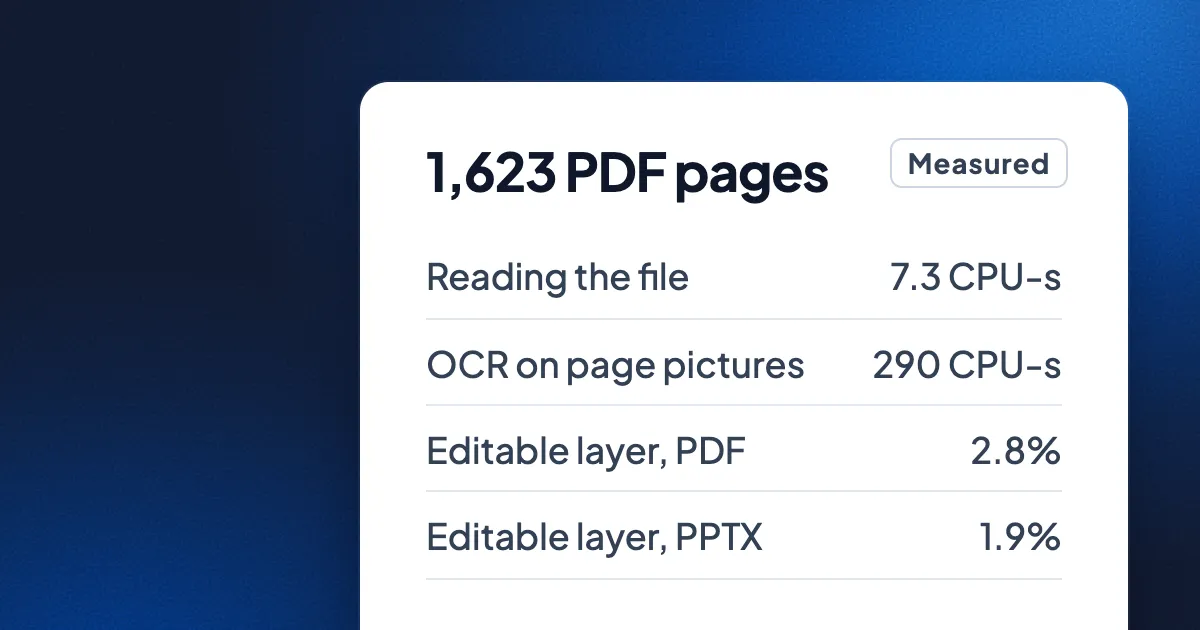
Short answer: to make a PDF editable, Eddocu reads the file itself: its text, fonts, pictures and positions. The other common way is to turn every page into a picture and read the picture back with OCR or an AI vision model. We measured both on the same 1,623 pages. Reading the file took about 40 times less processor time and was about 74 times faster, used no graphics chip or AI accelerator, and kept the layout that OCR throws away. The editable layer it keeps is small too: about 3% of the PDF and 2% of the PowerPoint files we tested. Below are the measurements, what they mean in energy, and where Eddocu is not lighter.
Two ways to make a document editable
A PDF made by a program (an invoice, a report, a contract, a paper) already contains its words as text, with the font and the position of every line. Some tools use that directly. Others, especially converters that promise a perfect Word file or an AI that "reads" your PDF, render each page as an image first and then recognise the letters in the image again. That second road is the only one for a scan or a photo, which has no text inside. For every other PDF, it is a long way round to words that were already there.
- Reading the file (what Eddocu does for PDF, Word and PowerPoint): parse the file, keep the text as text, keep each font, picture and shape where it was.
- Reading pictures of the pages (OCR, or an AI vision model): draw each page at high resolution, run a recognition model over millions of pixels, then guess the lines, the fonts and the layout back.
What we measured
On one MacBook Pro with an M3 Pro, we took 23 PDFs from our test set: 65.1 MB and 1,623 pages of reports, papers, forms and other real-world files, in several languages. First, Eddocu imported all of them into editable documents, the same import the apps run when you open a file, including a preview of the first page. Then, for the same pages, we ran Apple's own text recognition (Vision, at its accurate setting) on each page drawn at twice its size, which is the usual OCR setup on a Mac.
| 1,623 pages | Eddocu, reading the file | OCR, reading page pictures |
|---|---|---|
| Time on the clock | 3.6 s | 264 s (4 min 24 s) |
| Processor time | 7.3 CPU-seconds | 290 CPU-seconds |
| Graphics chip or AI accelerator | Not used | Used, and not counted above |
| Peak memory | 215 MB | Not measured |
| What comes out | Editable pages: text, fonts, pictures, shapes, positions | 1.78 million characters of text, no layout |
Per 1,000 pages that is about 4.5 CPU-seconds against about 179. Drawing the pages for OCR alone took about 7.4 seconds, about as long as Eddocu's whole import, before any recognition started. On a smaller set of 22 everyday pages (invoices, a contract, an agenda, a plan) the gap was smaller, 0.99 against 8.4 CPU-seconds, and the clock time was 1.2 seconds against 41.
The OCR numbers flatter OCR: Apple's recogniser can hand part of its work to the Neural Engine and the graphics chip, which time does not count, and its output is plain text. Turning that text back into an editable page with the right fonts, columns and tables is more work again, and usually where AI vision models come in.
No graphics chip, no data centre
Eddocu draws pages on the processor. We tried graphics-chip painters in our test bench, and the apps ship the processor one. Reading a PDF's text needs no recognition model at all, so nothing runs on an AI accelerator and nothing is sent to a server's graphics cards. In the Eddocu apps the import runs on your own phone or computer, so the file isn't uploaded either.
We did not measure cloud OCR or AI vision services, so we won't put a number on them. What we can say is that they do the OCR work above plus the upload, on graphics cards in a data centre, for every page.
In energy: an estimate
The next numbers are estimates, not measurements. We assume a busy performance core of this processor uses about 5 watts, and we count only processor time, which leaves out the Neural Engine and graphics work that OCR also used.
| Estimate, processor only | Eddocu | OCR |
|---|---|---|
| Per 1,000 pages | about 0.006 Wh | about 0.25 Wh |
| Per billion pages | about 6 kWh | about 250 kWh |
To be honest about scale: for one person, 0.25 Wh per thousand pages is close to nothing. A phone battery holds about 15 Wh. The difference adds up where pages are counted in billions: a service that makes a billion pages editable by reading them as pictures spends, by this estimate, about 240 kWh more than reading the files, every time, before counting accelerators, uploads and the data centre's cooling. At an average of about 0.45 kg of CO₂ per kWh, that is around 110 kg of CO₂ per billion pages from the processor alone. It is not the biggest number in anyone's climate budget. It is waste with no benefit, though, because for most PDFs the text was already in the file.
The everyday benefit is easier to feel: on the same Mac, a 40-page report becomes editable in about a tenth of a second by reading the file, against about six seconds by OCR, and less work means a quieter fan and a battery that lasts longer.
Smaller, in what way?
When Eddocu opens a file it keeps two things: the original, untouched, and an editable copy split into parts: the text and layout of each page, and the pictures, fonts and vector shapes it uses. We imported our test set of 40 PDFs, 23 PowerPoint decks and 33 Word files and measured each part.
| PowerPoint | Word | ||
|---|---|---|---|
| Files | 40, 122.9 MB | 23, 74.3 MB | 33, 30.9 MB |
| Text and layout, compressed | 3.4 MB (2.8%) | 1.4 MB (1.9%) | 14.7 MB (48%) |
| Pictures | 102.9 MB | 42.6 MB | 23.6 MB |
| Fonts | 12.3 MB | 5.7 MB | 1.2 MB |
What that means in practice:
- The editable part is tiny next to the file. For PDFs and decks, everything you can edit (every word, line and position) compresses to 2 to 3% of the file. Most of a document's weight is its pictures and fonts, which are stored once and shared by the pages that use them.
- A page needs only its own parts. Opening page 30 of a long PDF loads that page's text and pictures, not the whole file.
- An edit is a few bytes. Changing the date on an invoice added one 94-byte entry to the document's edit history. A program that saves by rewriting the file writes the whole 74 KB again; that is about 800 times more for the same change.
- The same picture is stored once. Pictures are named by their content, so a logo repeated on every page or slide is one file.
- Exports can come out smaller. The invoice we edited on an iPhone was 74 KB as received and 17 KB when Eddocu exported it. That depends on how the original was made, so it won't happen to every file.
Where Eddocu is not lighter
- On disk, a library takes more room than the files alone. Eddocu keeps your original next to the editable copy and page previews. In our test, the PDFs took about 2.2 times their own size in Eddocu's store, the decks about 2.1 times and the Word files about 3.6 times.
- Word files grow. A .docx is already compressed text without positions; Eddocu lays the pages out and stores where every line sits, so the layout part came to 48% of the Word files compressed and 127% before compression.
- Scans still need OCR. A photo or a scan has no text inside, so Eddocu reads it with recognition too, on your device (Scan to PDF with Text boxes). The savings above are for documents that already contain their text, which is most PDFs people send each other.
- Many editors read the file too. Desktop PDF editors that change a PDF's own text work the same way and avoid OCR as well. The comparison above is with tools that take the picture road for every page.
FAQ
Does Eddocu use OCR to edit PDFs?
Not for PDFs that contain text. It edits the text that is in the file. OCR is used only for scans and photos, when you choose Text boxes.
Does Eddocu need a graphics card?
No. In the Eddocu apps, opening, editing and drawing pages run on the processor, on phones and computers alike.
How did you turn processor time into energy?
With one assumption: about 5 watts per busy performance core. Real power depends on the chip and its load, so read the energy figures as orders of magnitude. The processor times themselves are measured.
Facts checked on 14 November 2026 on a MacBook Pro (M3 Pro) with Eddocu's offline core and Apple Vision text recognition, timed with /usr/bin/time; sizes were read from Eddocu's store after importing each set of files.
Related posts
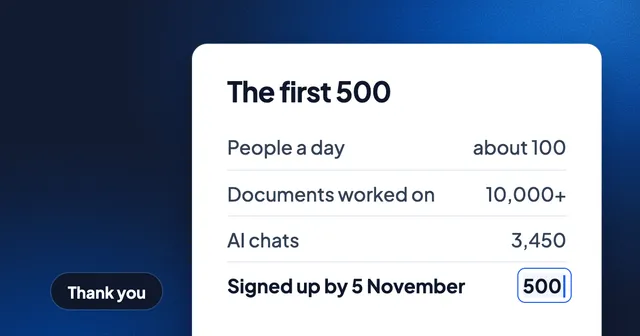
Thank You, First 500: What You Did With Eddocu, and What We Fixed Since
On 5 November the 500th person signed up. About 100 people use Eddocu on a typical day, and together you opened or edited more than 10,000 documents. What we shipped since, what's still missing, and how to tell us.
Story 3 min read

Why We Built a Document Editor That Works Offline
One editor for PDF, DOCX and PPTX on every device, running on your hardware, free for personal use. The decisions behind Eddocu and what they cost.
Story 4 min read
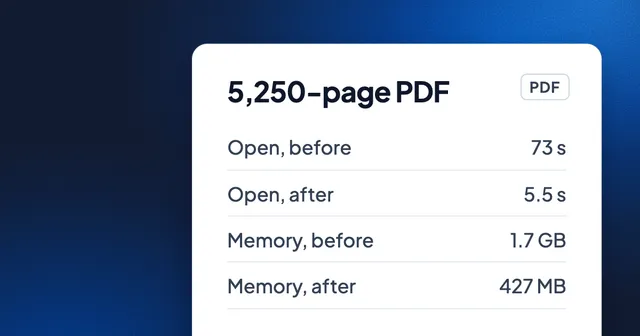
A 5,250-Page PDF in 5.5 Seconds: How We Made Huge Documents Open Fast
One round of engine work took a 5,250-page PDF from 73 seconds to about 5.5, and blank pages while scrolling from 57.8% of frames to 1.2%. Before-and-after numbers on the same files, and what changed.
Story 4 min read