Overleaf to Word: Get a DOCX From Your Project
Overleaf has no Word export. Download the source .zip and convert it in a browser or with pandoc, match the compiler, and keep the LaTeX and Word copies in step.
3 min read
Short answer: Overleaf has no Word export. Its download menu gives you the project's source as a .zip or the compiled PDF. To get a DOCX, download the source .zip and convert it: in a browser with Eddocu's LaTeX to Word, which compiles the project on your computer, or with pandoc on the command line. Converting the PDF instead is the last resort, because equations break apart.
Eddocu is the editor we make. What Overleaf offers is taken from its own documentation and plans page, linked below; our side-by-side is at Eddocu vs Overleaf.
What Overleaf lets you download
Overleaf's guide to downloading a project lists two choices in the project menu: Download as source (.zip), with every .tex, .bib, image and style file, and Download as PDF. Paid plans add Git, GitHub and Dropbox sync, which give you the same source files. None of them is a Word file, so the conversion happens outside Overleaf.
Three ways from an Overleaf project to a DOCX
| Route | What you need | Equations | Citations | Upload |
|---|---|---|---|---|
| Source .zip into LaTeX to Word (Eddocu) | A browser | As compiled | As BibTeX printed them | None |
| Source .zip into pandoc | pandoc installed, a terminal | Word equations | With --citeproc and the .bib | None |
| PDF into Word | Microsoft Word | Broken or pictures | As printed | None |
In a browser: the source .zip into LaTeX to Word
- In Overleaf, open the project, then the menu, and choose Download as source (.zip).
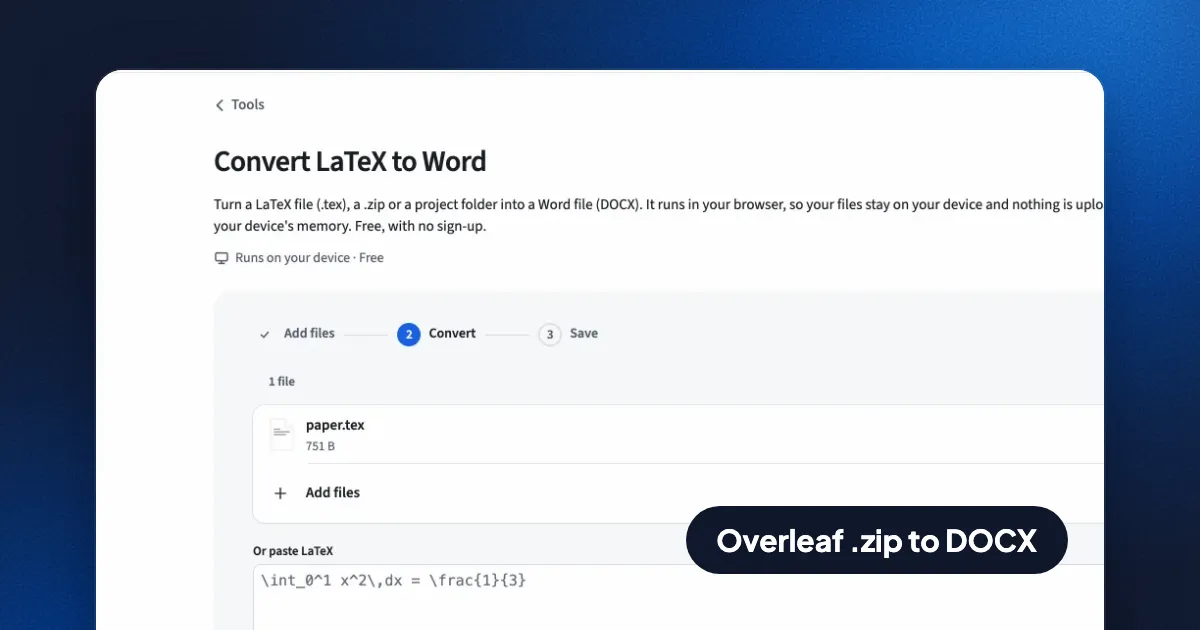
- Open LaTeX to Word and drop the .zip in as it is. There is no need to unpack it.
- Click LaTeX to Word and save the DOCX.
The page finds the main .tex file in the project and compiles it with TeX inside the browser tab, so the paper is not uploaded anywhere. Your figures, .bib file and custom styles come with the .zip, which is why the source download works better than copying a single .tex file. Read how to convert LaTeX to Word for what to check in the result.
Pick the same compiler as in Overleaf
Overleaf compiles with pdfLaTeX unless the project's settings say otherwise; it also offers LaTeX, XeLaTeX and LuaLaTeX, as its compiler guide explains. Look at the menu before you convert. A project set to XeLaTeX or LuaLaTeX usually loads fontspec for its fonts, and a bibliography built with biblatex runs Biber. pandoc ignores both. If you import the project into the Eddocu web editor instead of using the converter, that import runs pdfLaTeX with classic BibTeX, so switch a biblatex project to BibTeX first.
With pandoc on your computer
Unpack the .zip, open a terminal in the folder and run pandoc main.tex -o paper.docx --citeproc --bibliography=references.bib, with your own file names. pandoc turns the maths into Word equations, which reviewers can edit. It does not run TeX, so TikZ figures, two-column layout and commands from packages it does not know are lost. It works best for a short paper in plain LaTeX.
Keeping Overleaf and Word in step
Once a DOCX goes out for comments, there are two versions of the paper. Decide which one is the source. If the paper stays in LaTeX, copy the accepted changes back into Overleaf by hand and convert again for the next round. If it moves to Word for good, freeze the Overleaf project so nobody edits the old copy. For readers who only comment, the PDF is enough: Overleaf's PDF download keeps the layout exactly.
On Overleaf's free plan a project has one collaborator, compiles stop after 10 seconds and history goes back 24 hours, according to its plans page. A long thesis that times out there can still be converted from its source .zip, because the converter compiles on your own computer. The LaTeX tools page also has a browser editor and LaTeX to PDF.
Facts checked on 29 November 2026 on docs.overleaf.com, overleaf.com and eddocu.com.
FAQ
Does Overleaf have a Word export?
No. It downloads a project as a source .zip or as a PDF. Convert the .zip to get a DOCX.
Can I convert an Overleaf project without installing anything?
Yes. Drop the source .zip into LaTeX to Word in your browser. It needs no account and does not upload the files.
Why not just open Overleaf's PDF in Word?
Word rebuilds a PDF from positioned letters, so equations, tables and two-column pages come out broken. The source holds the real structure.
My project uses XeLaTeX. Will it convert?
Check the result closely. The Eddocu web editor's LaTeX import runs pdfLaTeX only, and pandoc ignores the font setup, so text in other scripts or special fonts may need fixing.