Why Large PDFs Open Slowly (and What Actually Helps)
Whole-file reading, big pictures, embedded fonts, drawing unseen pages and memory: why big PDFs open slowly, and which fixes are yours and which belong to the software.
Updated 7 min read
Short answer: a large PDF opens slowly when the program reads more of it than it needs before showing anything. The usual causes are reading the whole file up front, big pictures that must be decoded, embedded fonts that must be loaded, drawing pages nobody is looking at yet, and memory that grows with the file instead of with the screen. What helps most is a viewer that only does the work for the page in front of you; after that, smaller pictures, a "Fast Web View" (linearized) PDF for files opened over a network, and splitting files that are really several documents.
What is inside a PDF
A PDF is a collection of numbered objects: pages, the drawing instructions for each page, fonts, pictures. A table near the end of the file, the cross-reference table, says where each object starts. A PDF reader normally reads that table first, then jumps to the objects it needs. In principle, a reader can show page 1 of a 5,000-page PDF without touching the other 4,999 pages.
In practice, many programs do much more than that before the first page appears. That extra work is where the waiting comes from.
Why a large PDF opens slowly
1. The whole file is read before anything shows
Some programs walk every page when a file opens: to count pages, build thumbnails, extract text for search or check the document. On a 20-page file nobody notices. On a 2,000-page manual, that walk is the delay. A damaged cross-reference table makes it worse: the reader then has to scan the entire file to find the objects again.
2. The file has to arrive first
The cross-reference table sits at the end of the file, so a PDF opened from a website or a cloud drive often has to download in full before page 1 can be drawn. A linearized PDF, which Acrobat calls "Fast Web View", puts what the first page needs at the start of the file, so a viewer that supports it can show page 1 while the rest is still coming.
3. Big pictures
Scans and photo-heavy reports are mostly pictures. A page scanned at high resolution can hold a picture of tens of millions of pixels, and each one must be decoded before the page can be drawn. Some compression formats are also slow to decode. A picture that is shown at the size of a thumbnail still costs its full size to decode if the reader does not take a shortcut.
4. Embedded fonts
A PDF usually carries its own fonts so it looks the same everywhere. Each font must be read and prepared before text in it can be drawn. A file that embeds many full fonts, rather than only the letters it uses, gives the reader more to load, and a reader that prepares every font before showing page 1 makes you wait for all of them.
5. Drawing pages you are not looking at
Some readers draw pages ahead of where you are, or keep many drawn pages around. That is useful for smooth scrolling, but if it happens before the first page, or if a fast scroll asks for dozens of pages at once, the screen shows blank rectangles while the reader catches up.
6. Memory that grows with the file
If a reader keeps every page's details in memory once read, memory use grows with the size of the document. On a computer with little free memory, the system starts swapping, and everything slows down, not only the PDF.
What actually helps
| Cause | What helps | Who can do it |
|---|---|---|
| Whole file read up front | A viewer that reads pages only when they are needed | The software maker |
| File must download first | Save with Fast Web View (linearized); open a local copy | Whoever makes the PDF; you |
| Big pictures | Reduce picture resolution when saving or scanning | Whoever makes the PDF |
| Many full fonts | Embed only the letters used (font subsetting) | Whoever makes the PDF |
| Drawing unseen pages | A viewer that draws the visible pages first | The software maker |
| Memory grows with the file | A viewer whose memory grows with what you look at | The software maker |
| One file that is really many documents | Split it into parts | You |
Most of these fixes belong to the software, not to you. That is the honest part: you can shrink pictures and split files, but a reader that walks every page on open will stay slow on a long document however you save it.
Things you can do today
- Open a local copy. Download the PDF once instead of opening it from a link each time.
- Scan at the resolution you need. A text page rarely needs the highest setting your scanner offers.
- Save with smaller pictures when the PDF is for reading on screen, not for print.
- Turn on Fast Web View when you publish a PDF on a website, if your tool offers it, or run the file through a linearize tool.
- Split archive files that join many unrelated documents into one. Our guide to merging PDFs without uploading covers the reverse too.
- Close other heavy programs if your computer is short on memory.
What we changed in Eddocu
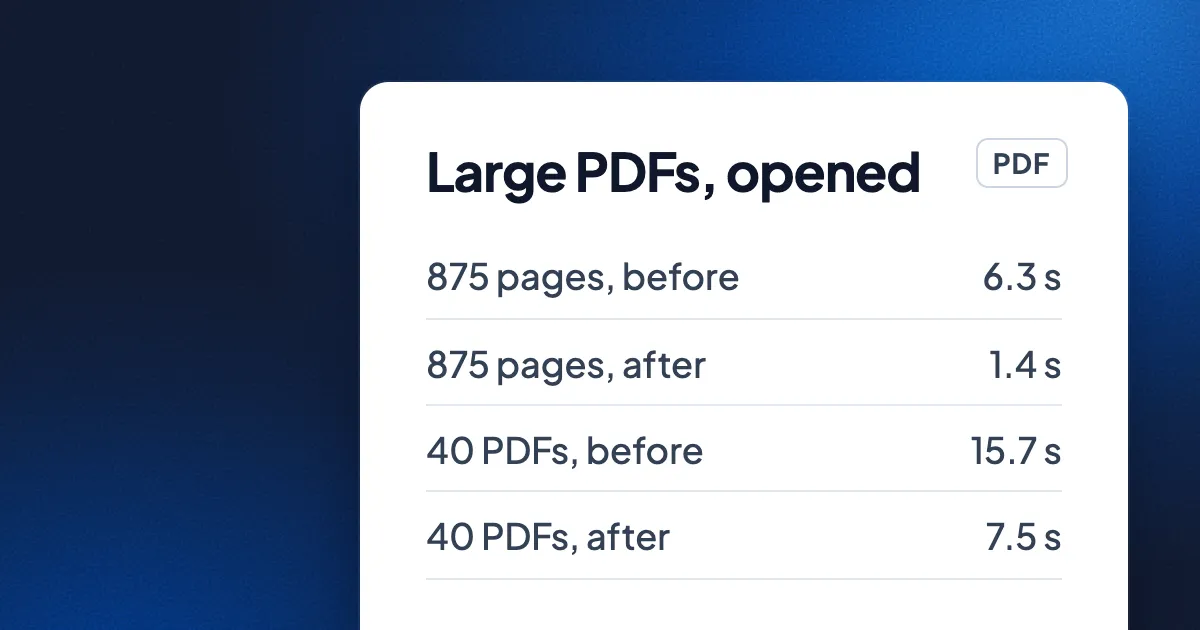
Eddocu is the editor we make, and slow large files are what we test with on purpose. Eddocu opens PDFs with its own offline core, which lets us remove work rather than speed it up. In one round of engine work measured on 1 November 2026 on a MacBook Pro with an M3 Pro chip, on the same files before and after:
| File | What we timed | Before | After |
|---|---|---|---|
| 5,250-page PDF | Fully open | 73 s | about 5.5 s |
| 5,250-page PDF | Peak memory | 1.7 GB | 427 MB |
| 875-page PDF | Fully open | 6.3 s | about 1.4 s |
| 40 everyday PDFs | All opened, total | 15.7 s | about 7.5 s |
| 40 everyday PDFs | Processor instructions to open | 476 billion | about 191 billion |
The gains map onto the causes above. Eddocu stopped reading a page's details until the page is needed and stopped decoding pictures nobody will see. Page data is kept in compact columns, so memory grows with what you look at, not with the file. While you scroll fast, the editor shows a ready picture of each page and builds the editable text only for the pages you stop on. In a fast fling through an 875-page PDF full of images, measured on 8 November 2026 in Chromium slowed down 4 times, frames with blank pages went from 57.8% to 1.2%.
The full set of numbers, Word and PowerPoint files included, is in how huge documents open fast, and the design behind it is in why we built our own document engine.
Where other tools are better
- Fixing the file itself. Eddocu's editor speeds up opening, but it does not rewrite the file to be lighter for everyone else. For that, Eddocu has separate Compress PDF and Linearize PDF tools. Acrobat Pro's PDF Optimizer is the long-standing choice when you want to tune pictures and fonts one setting at a time.
- A comparison we have not made. The numbers above are Eddocu before and after. We have not yet timed other editors on the same files, so we do not claim Eddocu is faster than any of them. That test will be its own post, with files and scripts.
- Low-end phones. We have measured on emulators, not yet on real low-end Android phones.
FAQ
Why does my PDF take so long to open?
A slow PDF is usually a long PDF, a PDF with large pictures, or a PDF opened from the network. The reader may be reading the whole file, decoding every picture or preparing every font before it shows the first page.
Does a smaller file always open faster?
Not always. A small file with thousands of pages can open more slowly than a large file with a few big pictures. What matters is how much work the reader does before the first page, not the file size alone.
What is a linearized PDF?
A linearized PDF, called Fast Web View in Acrobat, stores what the first page needs at the start of the file. A viewer that supports it can show page 1 over the network before the whole file has downloaded. It does not help a file that is already on your computer much.
Will compressing a PDF make it open faster?
Lowering picture resolution usually helps, because there is less to decode. Compression that only makes the file smaller on disk, without changing the pictures, helps mainly when the file travels over a network.
Can I open a huge PDF without uploading it?
Yes. The Eddocu apps open PDFs with the offline core on your device, with no upload and no account. Get them at eddocu.com/download; Eddocu is free for personal use, with no ads. See features for the rest.
Facts checked on 16 November 2026. Eddocu numbers from our engine performance notes: opening measured on 1 November 2026 and scrolling on 8 November 2026, on a MacBook Pro with an M3 Pro chip, as published in how huge documents open fast.