Best Free PDF Editor for Mac Beyond Preview (2026)
What Preview does well, and the free Mac tools that also change the existing text: LibreOffice Draw, PDFgear and Eddocu, with Skim and Acrobat Reader for reading and comments.
Updated 6 min read
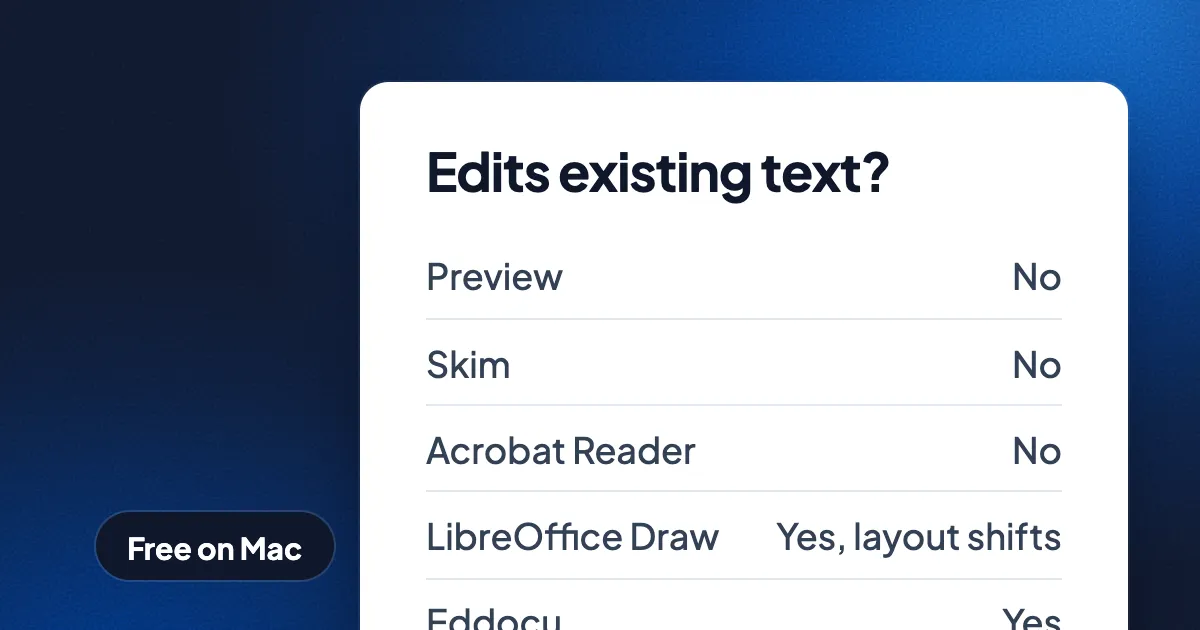
Short answer: Preview, which comes with every Mac, annotates, signs, fills forms and reorders pages for free, but it cannot change the text that is already in a PDF. For free text editing on a Mac, the options are LibreOffice Draw (free and open source, with layout loss), PDFgear (free, closed source) and Eddocu (free for personal use, edits text in place, works offline). Skim is the best free choice for reading and annotating papers. Adobe Acrobat edits text too, but only on a paid plan.
This guide starts with what Preview does well, since many people need nothing more, then covers the free tools that go further and what each one cannot do.
Free Mac PDF tools compared
| Tool | Annotate and sign | Reorder, merge pages | Edit existing text | Price |
|---|---|---|---|---|
| Preview | Yes | Yes | No | Free, built in |
| Skim | Yes, notes and highlights | No | No | Free, open source |
| Adobe Acrobat Reader | Yes | No | No | Free |
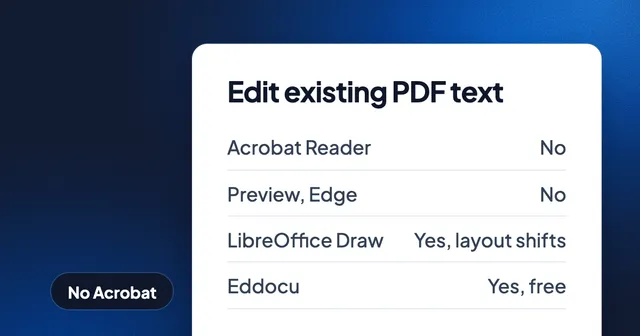
| LibreOffice Draw | Yes | Partly | Yes, layout often shifts | Free, open source |
| PDFgear | Yes | Yes | Yes | Free, closed source |
| Eddocu | Yes, drawn signatures | Yes | Yes | Free for personal use |
| Adobe Acrobat Standard or Pro | Yes | Yes | Yes | Paid, from $179.88 a year |
Preview: more than most people use
Preview is the Mac's built-in PDF viewer, and it is a capable tool. The Markup toolbar adds highlights, underlines, shapes, arrows, notes and typed text boxes. Preview fills in PDF forms. Preview signs a document with a signature you draw on the trackpad, write on paper and hold up to the camera, or draw on a nearby iPhone or iPad. In the sidebar, Preview reorders, rotates and deletes pages, and you can drag pages from one PDF into another to merge files. Preview also exports a PDF with a smaller file size.
Preview does not edit the PDF's own text. A text box you add sits on top of the page. To fix a typo in the original text, change a price or delete a paragraph, you need one of the tools below.
Stay with Preview if you sign, fill in, mark up and rearrange PDFs, and never change the words.
Skim: for reading papers
Skim is a free, open-source PDF reader built for reading and annotating academic papers. Skim's notes and highlights can be listed, searched and exported, and Skim works with LaTeX tools to jump between the PDF and its source. Skim does not edit existing text or rearrange pages.
Adobe Acrobat Reader: free, but read and comment only
Acrobat Reader is free on the Mac and reliable with complex forms. Acrobat Reader views, comments, fills and signs. Editing text and organizing pages starts with Acrobat Standard at $179.88 a year, and Acrobat Pro is $239.88 a year; see what document software costs in 2026.
LibreOffice Draw: free text editing, with layout loss
LibreOffice Draw opens a PDF and turns its content into shapes and text boxes you can edit. LibreOffice is free and open source, and it runs on Mac, Windows and Linux. The catch is fidelity: a paragraph often becomes one text box per line, fonts that are not installed get replaced, and spacing shifts. For a one-word fix on a simple page, LibreOffice Draw works. For a designed brochure or a contract, check every page before you send the file.
PDFgear: a free all-in-one, closed source
PDFgear is a free PDF editor with a Mac version. PDFgear edits existing text, converts PDFs to other formats, organizes pages and includes an AI assistant. PDFgear is closed source, and some of its tools work online; check the vendor's current terms and which features process files on their servers before you use it for private documents.
Eddocu: edit the text, offline, with PDF, DOCX and PPTX in one app
Eddocu is the editor we make, so read this section with that in mind. The Eddocu Mac app is one universal app for Apple silicon and Intel Macs, for macOS 13 and later. The Eddocu Mac app is signed and notarized by Apple, so it opens without the security warning. You download it as a .dmg from eddocu.com/download, and it updates itself from the app.
Eddocu opens PDF, DOCX and PPTX files on your Mac, with no account and no network connection. Eddocu lets you change the existing text in the document's own font, move images, add, delete and reorder pages, and highlight. You can export the result as PDF, or as DOCX or PPTX if someone needs to keep editing it.
Where Eddocu is strong on a Mac:
- Edits the words already on the page, not a text box laid over them.
- Works offline. Your files stay on your Mac unless you turn on cloud sync.
- Make Eddocu the default app and PDF, DOCX and PPTX files open in it from Finder.
- Documents open in tabs, side by side in one window; drag a tab out to make a new window.
- Search lists matching file names and the matching pages inside documents; see searching inside documents.
- Free for personal use, with no ads. The paid plans add AI features and cloud sync; see pricing.
The same editor runs on Windows, Linux, the web, iPhone, iPad and Android, so a document looks the same on each. The full list is on the features page.
Where other tools are better
- Preview is already installed, starts instantly and signs with your iPhone or the camera. For forms and signatures it is often all you need.
- Acrobat has certificate-based digital signatures, redaction and form authoring. Eddocu signatures are drawn by hand, and Eddocu has no redaction tool yet.
- Skim is better for reading papers alongside LaTeX source.
- LibreOffice is fully open source, if that matters to you or your organization.
- Eddocu reads a PDF into its own editable format. Complex PDFs can come out slightly different; check the export before you send it.
How to edit PDF text on a Mac with Eddocu
- Download Eddocu from eddocu.com/download, open the
.dmgand drag Eddocu into Applications. - Open the PDF: drag it onto the Eddocu window, or use Open a file. The document opens for reading.
- Pick the text tool, click into the text you want to change and type.
- Move images, and add, delete or reorder pages in the slides panel.
- Use Export document to save a PDF, DOCX or PPTX.
For more on working without a connection, see how to edit a PDF offline. To combine files without an upload, see merging PDFs without uploading them.
FAQ
Can Preview edit the text of a PDF?
No. Preview adds text boxes, notes, shapes and signatures on top of the page, but it cannot change or delete the text that is already in the PDF.
What is the best free PDF editor for Mac?
It depends on the job. Preview is best for signing, forms and rearranging pages. Skim is best for reading papers. To change the existing text for free, use Eddocu (free for personal use), LibreOffice Draw or PDFgear.
Is there a free Adobe Acrobat for Mac?
Acrobat Reader is free, but it does not edit existing text or reorder pages. Those need Acrobat Standard or Pro, from $179.88 a year.
Can I edit a PDF on a Mac without the internet?
Yes. Preview, Skim, LibreOffice Draw and Eddocu all work offline. Eddocu needs no account to open and edit a file; only AI features and cloud sync need a connection.
Does Eddocu run on Apple silicon?
Yes. The Eddocu Mac app is one universal app for Apple silicon and Intel Macs, for macOS 13 and later.
Facts checked on 16 November 2026. Tool features and prices change; tell us at eddocu.com/contact if something here is out of date.