Certificates for Your Documents: What They Prove and How to Check One
What a document certificate and digital signature are, how to check one, how to sign a PDF with one, and what Eddocu can do.
Updated 5 min read
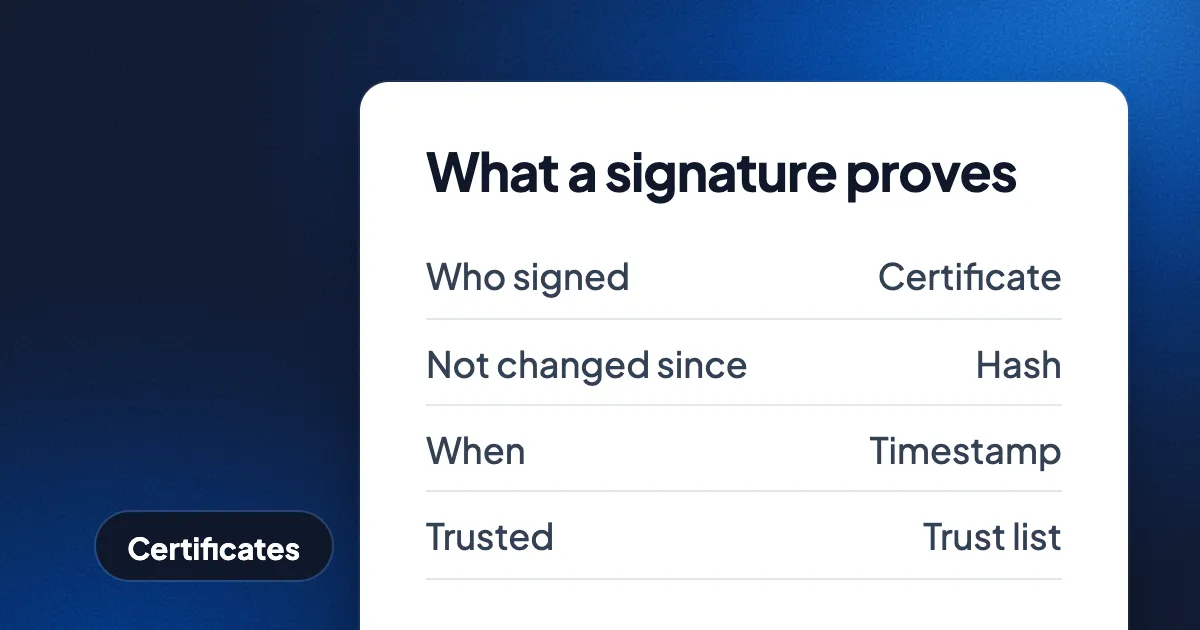
Short answer: a document certificate is a digital ID that ties a key to your name; signing a PDF with that key adds a digital signature that shows who signed and whether the file changed since. To check a signature, open the PDF in a reader with a signature panel, such as Adobe Acrobat Reader, and look at the signer, the time, and whether the issuer is trusted. To sign, you need a certificate from a certificate authority, your national eID, or a signing service. Eddocu's apps include two beta tools: Digitally sign PDF (sign with your own .p12 or .pfx file, on your device) and Check signatures.
Eddocu is the document editor we make. Nothing here is legal advice.
What a document certificate is
A certificate (an X.509 certificate) is a small file that says "this public key belongs to this person or organisation", signed by a certificate authority. The certificate comes with a private key that only you hold. Together, the private key and the certificate are often called a digital ID. On a computer the pair usually lives in a password-protected .p12 or .pfx file (PKCS#12), in the system keychain, on a smart card or USB token, or with a remote signing service.
A digital signature is what the private key produces for one document. The PDF reader hashes the signed bytes, and the signature proves that the holder of the private key signed exactly those bytes. Change one byte and the check fails.
Where certificates come from
- A commercial certificate authority issues document signing certificates to people and companies, usually after an identity check, for a yearly fee.
- A national eID in many EU countries carries a signing certificate on the ID card or in a mobile app, and some of those certificates are qualified under eIDAS.
- Your employer may run its own certificate authority for internal documents.
- A self-signed certificate costs nothing and proves that the file did not change, but it proves nothing about who you are: no one vouches for the name in it.
How to check a signature
A signature check answers a few separate questions. A green tick usually means all of them passed; a warning tells you which one did not.
| Question | What a good answer looks like |
|---|---|
| Has the document changed since it was signed? | No |
| Does the signature cover the whole file? | Yes, or only form fills and later signatures came after |
| Is the certificate's issuer trusted? | Yes, through a trust list your reader uses |
| Was the certificate valid and not revoked at signing time? | Yes |
| Is there a trusted timestamp? | Yes, for signatures that must last |
- Adobe Acrobat Reader (free, Mac and Windows) shows a signature panel with each signer and the result. Adobe Acrobat Reader trusts certificates on the Adobe Approved Trust List and the EU Trusted Lists.
- The European Commission's DSS demonstration validator checks PDF signatures against the EU Trusted Lists and reports the eIDAS level. The validator is a website, so the file is uploaded.
- Okular on Linux shows PDF signatures and their certificates.
- Eddocu's Check signatures (beta, in the apps, on your device) lists each signature with the signer, the time, the reason, the certificate chain, whether the signed bytes are unchanged, and whether the signature covers the whole file. Check signatures does not yet say whether the issuer is trusted, so use one of the tools above for that answer.
How to sign a PDF with a certificate
In Eddocu (beta)
- Open Digitally sign PDF in the Eddocu app and choose the PDF.
- Add your .p12 or .pfx file and type its password.
- Optionally add a reason, a location and contact details, and a visible signature box with a picture, on the page and position you pick.
- Save the signed PDF. Eddocu adds the signature as an incremental update, so earlier signatures in the file stay valid.
The tool runs on your device, so the PDF and the certificate are not uploaded. Today the tool makes a basic PDF signature without a trusted timestamp or long-term validation data, so it is not a PAdES B-T or B-LT signature.
With other tools
- Adobe Acrobat Reader: use a certificate to sign, then pick your digital ID from the keychain, a .p12 file or a token.
- LibreOffice: File, then Digital Signatures, then Sign Existing PDF, with a certificate from your system store.
- Okular: Tools, then Digitally Sign, on Linux.
- Your national eID app or a qualified trust service provider, when you need a qualified electronic signature.
Certificate signature or drawn signature?
| Need | Drawn signature with a record | Certificate signature |
|---|---|---|
| Signers without any setup | Yes | No |
| Proof inside the PDF | No | Yes |
| Checked by any PDF reader | No | Yes |
| Qualified signature under eIDAS | No | Only with a qualified certificate and device |
For everyday agreements, Eddocu's drawn signatures come with a signing record: who signed, when and how they confirmed, with a check for changes after signing. Signing requests go out by email, and Eddocu's verify page checks whether a file is the exact one Eddocu exported. The background is in the future of document signing.
Where other tools are better
- Trust decisions: Adobe Acrobat Reader and the EU's DSS validator check issuers against trust lists; Eddocu does not yet.
- Smart cards, tokens and system keychains: Adobe Acrobat Reader and LibreOffice use them; Eddocu's tool takes a .p12 or .pfx file.
- Timestamps and long-term validation: PAdES-capable tools add them; Eddocu's tool does not yet.
- The website: Eddocu's certificate tools run in the apps, not on eddocu.com.
FAQ
How do I know if a PDF is digitally signed?
Open the PDF in a reader with a signature panel, such as Adobe Acrobat Reader or Okular. A drawn picture of a signature on the page is not a digital signature; a digital signature appears in the signature panel.
Why does my reader say "validity unknown"?
"Validity unknown" usually means the bytes are intact but the reader does not trust the certificate's issuer, as with a self-signed certificate. The document may be fine; the signer's identity is just not vouched for.
Can I sign a PDF with a certificate for free?
Yes, if you already have a certificate: Adobe Acrobat Reader, LibreOffice, Okular and Eddocu's beta tool all sign without a fee. Many national eIDs include a free signing certificate. Certificates from commercial authorities usually cost a yearly fee.
Does Eddocu upload my certificate?
No. Digitally sign PDF runs in the Eddocu app on your device, and the certificate file and its password stay there.
Related: the future of document signing, PDF tools that don't upload your files, edit a PDF offline.
Facts checked on 16 November 2026 against Regulation (EU) No 910/2014, ETSI EN 319 142, Adobe's and the European Commission's help pages, and Eddocu's own tools. Tell us on the contact page if something has changed.