Why Eddocu Files Are So Small: One Binary Format, Pages Stored Apart, Edits in Bytes
How Eddocu's own document format keeps the editable part of a PDF or deck at 2 to 3% of the file, stores each page apart, and saves an edit as a few bytes. Measured, and where Word files grow.
Updated 6 min read
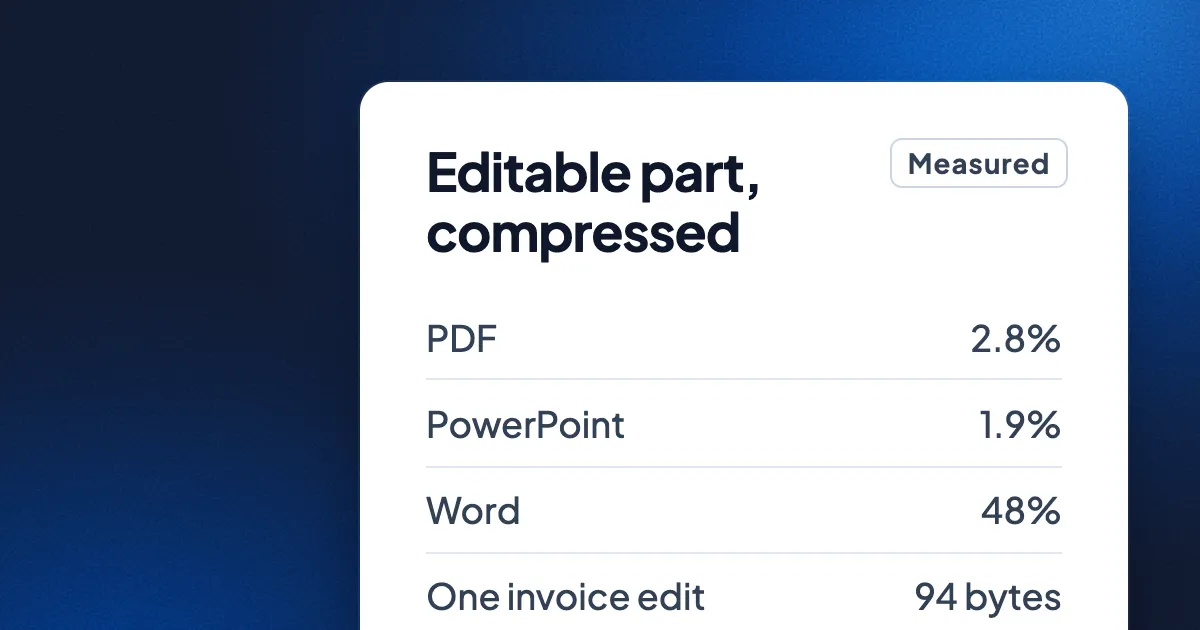
Short answer: Eddocu keeps every document in its own format, a compact binary one, whatever the document came in as: PDF, Word (DOCX) or PowerPoint (PPTX). In our storage test of 14 November 2026, the editable part of a document (every word, line and position) compressed to 2.8% of the PDF files and 1.9% of the PowerPoint files it came from. Pages are stored one by one, so a page arrives on its own, and an edit is saved as a few bytes instead of a rewritten file. Word files are the exception, and we show why below.
One document model, written in binary
A PDF, a DOCX and a PPTX are three different ideas of a document. A PDF is a list of drawing instructions per page. A DOCX and a PPTX are zip archives of XML: text wrapped in tags, with every attribute spelled out as words. Eddocu's offline core reads all three into one document model of its own: pages, text boxes, paragraphs, runs of text with their fonts, pictures, shapes and tables. The editor only ever sees that model, which is why one editor edits all three formats (more in why we built our own document engine).
Eddocu's format stores that model in a way built for size and speed:
- Columns, not tags. A page is a set of tables: one row per element, one column per property. The x positions of every box on a page sit next to each other, then the y positions, and so on. Similar numbers in a row compress far better than XML attributes repeated on every element.
- The smallest encoding wins. For each column, the writer tries several encodings and keeps the one that comes out smallest in bytes.
- Text is plain UTF-8. Words are stored once, as text, with no markup around them.
- Pages are compressed at rest. Each page is stored and served compressed with Brotli at its highest setting.
- Pictures and fonts are stored once. A picture is named by a hash of its content, so a logo repeated on every slide is one file, shared by every page that uses it.
Pages stored apart, arriving one at a time
An Eddocu document is not one big file. A small manifest lists the pages in order with their sizes, and each page is its own file. Inside a page, the parts are in sections: the boxes and their positions first, then text, tables, effects, charts and animations. A reader decodes a section only when something needs it, so a slide's animations are never read while you are only scrolling past it.
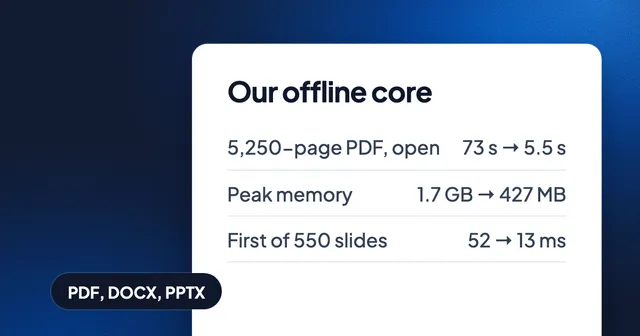
That is why opening page 30 of a long PDF loads page 30's text and pictures, not the whole file. In one internal measurement, the first page of a 3-page PDF needed 17 KB of document data before it could be drawn. The same design is what lets a 5,250-page PDF open fully in about 5.5 seconds on a MacBook Pro, as measured on 1 November 2026 (how huge documents open fast).
When a document on your device goes up to your Eddocu cloud, it travels as itself, in one stream, page first: each page goes right after the fonts and pictures it is the first to use, so the first pages are readable long before the last ones arrive. Text, fonts and vector shapes are compressed in that stream. Pictures that are already compressed, such as WebP and PNG, go as they are, because compressing them again saves next to nothing.
What we measured
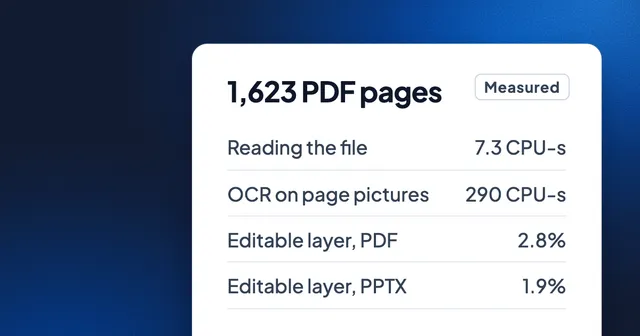
On 14 November 2026, on a MacBook Pro with an M3 Pro, we imported our test set of 40 PDFs, 23 PowerPoint decks and 33 Word files into Eddocu and read the size of each part from Eddocu's store. These are the same numbers as in our post on greener document editing.
| PowerPoint | Word | ||
|---|---|---|---|
| Files as received | 40, 122.9 MB | 23, 74.3 MB | 33, 30.9 MB |
| Text and layout in Eddocu, compressed | 3.4 MB (2.8%) | 1.4 MB (1.9%) | 14.7 MB (48%) |
| Pictures | 102.9 MB | 42.6 MB | 23.6 MB |
| Fonts | 12.3 MB | 5.7 MB | 1.2 MB |
The table shows where a document's weight really is. In PDFs and decks, almost all of it is pictures and fonts. Everything you can edit, every word and its position on the page, came to 2 to 3% of the original files once it was in Eddocu's format.
An edit is a few bytes
Most editors save by writing the whole file again. Eddocu saves an edit as an entry in the document's edit history that names what changed. In the same test, changing the date on an invoice added one 94-byte entry. A program that saves by rewriting the file writes the invoice's whole 74 KB again, about 800 times more for the same change.
The edit format is designed to keep everyday gestures tiny. By its specification, moving a box is about 8 bytes per box, and typing a character is about 10 bytes. Those are the format's design sizes, not a measurement of a session. Small edits matter most where the network is slow: syncing a correction from a phone on a train sends bytes, not the document.
Where Eddocu files are not smaller
- Word files grow. A DOCX is already compressed text without positions: Word works out where the lines go when it opens the file. Eddocu lays the pages out and stores where every line sits. For our Word files that layout came to 48% of the files' size compressed, and 127% before compression.
- A library takes more room than the files alone. Eddocu keeps your original file next to the editable copy and page previews, so you can always export the original. In our test, the PDFs took about 2.2 times their own size in Eddocu's store, the decks about 2.1 times and the Word files about 3.6 times.
- Pictures weigh what they weigh. A document full of photos is mostly photos, in any format. Storing each picture once helps when pictures repeat; it does not shrink a single photo.
- You share in standard formats. Eddocu's format is how the apps store and sync a document. When you send a document to someone, you export it as PDF, DOCX or PPTX, at that format's size. An export can come out smaller than the original (an invoice we edited on an iPhone went from 74 KB to 17 KB), but that depends on how the original was made.
Why small matters
Small is not a goal on its own. A small page arrives fast, so the first page shows before the rest of the document has loaded. A small edit syncs on a weak connection. A small editable layer leaves room on a phone for the documents themselves. Eddocu's apps for iPhone, iPad, Android, Mac, Windows and Linux are at eddocu.com/download, free for personal use, with no ads.
FAQ
What format does Eddocu save documents in?
In its own binary format, one file per page plus a manifest, written by Eddocu's offline core. The original PDF, DOCX or PPTX is kept next to it.
Can I still get a PDF, Word or PowerPoint file?
Yes. Eddocu exports to PDF, DOCX and PPTX, and you can export the original file at any time (PDF to Word and back).
Is an Eddocu file smaller than a PDF?
The editable part is. In our test it was 2.8% of the PDFs' size. Pictures and fonts keep their weight, and the apps also keep your original, so a library on disk is larger than the PDFs alone.
Does a smaller file mean lower quality?
No. The saving comes from storing text as text and positions as numbers in columns, not from lowering picture quality. Text stays selectable and editable.
Facts checked on 16 November 2026 against the specification of the format in Eddocu's offline core. Storage numbers measured on 14 November 2026 on a MacBook Pro (M3 Pro), read from Eddocu's store after importing each set of files; opening times measured on 1 November 2026 on the same kind of machine.