The Future of Digital Documents
Documents as editable data, offline and private by default, the same on every device, with AI inside and PDF, DOCX and PPTX in and out. Our view, with what Eddocu ships today marked apart from the vision.
Updated 6 min read
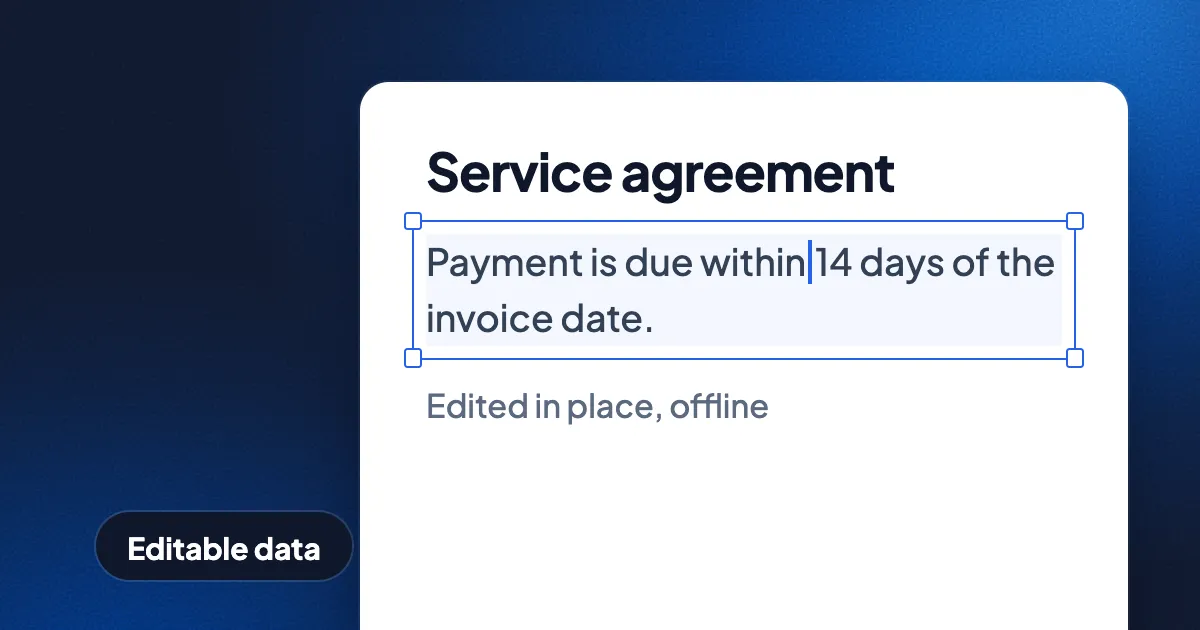
Short answer: we think the next document is editable data, not a printed picture. It opens and edits offline, stays private by default, looks the same on every device, has AI working inside it, and still goes in and out as PDF, DOCX and PPTX. This is an opinion piece from the team that makes Eddocu, a document editor for PDF, DOCX and PPTX that works offline, is free for personal use and shows no ads. For each idea we say what Eddocu ships today and what is still a vision.
Documents are still pictures of paper
The PDF was made to print the same way everywhere, and it does that well. More than thirty years on, most documents people send each other are still built like printouts: fixed pages, meant to be looked at. Changing one word in a PDF often means finding the source file, buying an editor, or uploading the PDF to a website that turns each page into a picture and reads the letters back.
We think that is the wrong way round. A document made by a program already contains its words, fonts and positions. The future document treats those as data you can edit, search and reuse, while the page still looks exactly as it did.
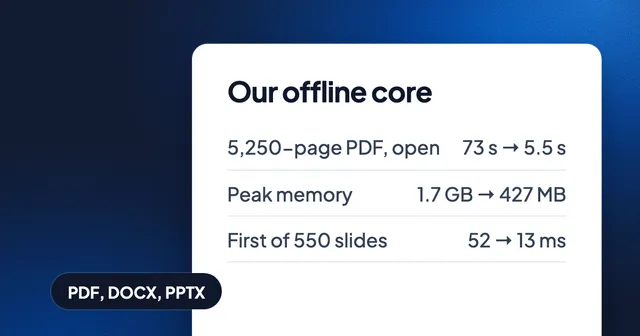
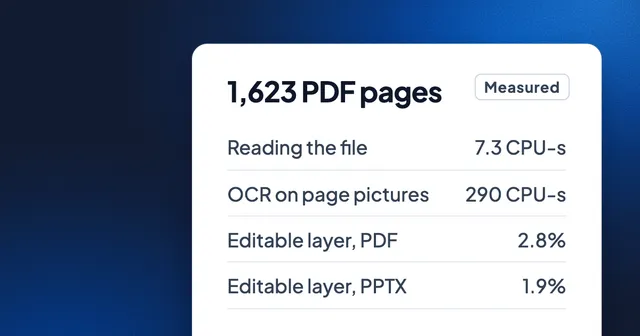
What ships today: Eddocu opens a PDF, a Word file or a PowerPoint deck as editable pages, by reading the file itself rather than pictures of it. Its offline core turns all three into one document model, so one editor edits them all (why we built our own document engine). In our measurement of 14 November 2026, reading 1,623 PDF pages as files took about 40 times less processor time than OCR on pictures of the same pages (the numbers).
Offline and private by default
A contract, a payslip or a medical letter should not need a server to be edited. We believe the default should be that a document is opened, edited and searched on the device that holds it, and leaves only when its owner sends it.
What ships today: the Eddocu apps open and edit documents with no account and no internet connection, and offline editing is part of the free plan. Most of the apps (all but the Mac App Store version) keep their own search index on the device, so a search finds words inside your files without a connection (search inside documents). Documents are private by default and not used to train AI models. The website is the exception: it needs a connection, and offline editing is in the apps.
Every device, one document
People do not work on one device. A deck started on a laptop gets fixed on a phone and presented from a tablet. We think a document should look and behave the same on each, without a lighter mobile copy that drops features.
What ships today: Eddocu runs in the browser and as apps for Windows, Mac, Linux, iPhone, iPad and Android, all from one shared engine, so the phone runs the same code as the computer (why we built Eddocu). A browser extension for Chrome, Firefox and Opera opens PDF and PowerPoint links straight in Eddocu. Documents in your Eddocu cloud appear on every device you sign in on.
AI that works inside the document
Most AI tools today sit next to a document: you paste text into a chat and paste the answer back, and the layout is lost on the way. We think AI belongs inside the document, editing the real pages, with every change visible and yours to keep or undo.
What ships today: Eddocu's AI workspace creates reports, documents and decks from a brief and translates a whole PDF or deck while the layout stays in place. The AI chat can run on Eddocu's models, on a coding agent you already use (Claude Code, Codex or Gemini CLI), or on your own API key, and it reads and edits PDF, Word and PowerPoint files with the layout kept (AI chat, coding agents and MCP). Agents, keys and MCP servers are in the desktop apps (the Mac app from eddocu.com, Windows and Linux). AI features need a connection: the text they need is sent to a model provider, and the app asks first.
Vision, not shipped: more of that AI running on the device itself, so private documents get AI help without leaving it. Phones and laptops are getting the chips for it. We are not there yet, and we will say so when we are.
Formats that stay open
A document should outlive the app that made it, ours included. So we treat PDF, DOCX and PPTX as the doors in and out: whatever an editor stores inside, you should always be able to take your work out in a standard format that other software opens.
What ships today: Eddocu opens PDF, DOCX and PPTX, and exports to PDF, DOCX and PPTX (PDF to Word and back). It keeps your original file, and you can export that original at any time. Inside, Eddocu stores documents in its own compact format, which keeps the editable part of a PDF at about 3% of the file's size (how Eddocu files stay small). That format is how the apps store and sync; it is never what you have to send to someone else.
Today and tomorrow, side by side
| Idea | Ships in Eddocu today | Where |
|---|---|---|
| Edit a PDF, DOCX or PPTX as it is | Yes | Web and apps |
| Open and edit with no connection | Yes | Apps only |
| No account needed to edit | Yes | Apps only |
| Same engine on every device | Yes | Web, Windows, Mac, Linux, iPhone, iPad, Android |
| AI creates and translates inside the document | Yes, needs a connection | Web and apps |
| Your own coding agent or MCP servers | Yes | Mac app from eddocu.com, Windows, Linux |
| Export to PDF, DOCX and PPTX | Yes | Apps on the device; web on our servers |
| AI that runs fully on the device | No, a vision |
Where today's tools are still better
- Scans need recognition. A photo or a scan has no text inside, so it still needs OCR. Eddocu does that on the device too (Scan to PDF with Text boxes), but no file format makes a picture editable by itself.
- Complex PDFs can shift. A PDF can come out slightly different after editing, so we tell people to check the export.
- The source app knows its format best. Word is still the reference for every corner of a Word file, and PowerPoint for a deck. We judge our imports by how close they look to those apps.
We will keep building toward the documents described here, and we publish what changes in every release on the changelog. To try what ships today, get the apps at eddocu.com/download, free for personal use.
FAQ
Will PDF go away?
We do not think so, and we do not want it to. PDF is a good way to send a page that must look the same everywhere. What we think changes is that a PDF you receive becomes something you can edit as easily as you read it.
Can I edit documents without an internet connection?
Yes, in the Eddocu apps for Mac, Windows, Linux, iPhone, iPad and Android, with no account. The website needs a connection.
Does Eddocu lock my documents into its own format?
No. Eddocu exports to PDF, DOCX and PPTX, and keeps your original file so you can export it unchanged at any time.
Does Eddocu's AI run on my device?
Not today. AI features send the text they need to a model provider, and the app asks first. Editing, search and export run on your device in the apps.
Facts checked on 16 November 2026 against eddocu.com's llms.txt and our earlier posts linked above. Sections marked "Vision, not shipped" and the "No, a vision" row describe plans, not features.