One Rust Core, Seven Shells: How Eddocu Runs on Every OS
Mac, Windows, Linux, iPhone, iPad, Android and the web from one offline core and one interface. How thin native shells, platform adapters and a single wire schema keep seven builds behaving the same.
Updated 6 min read
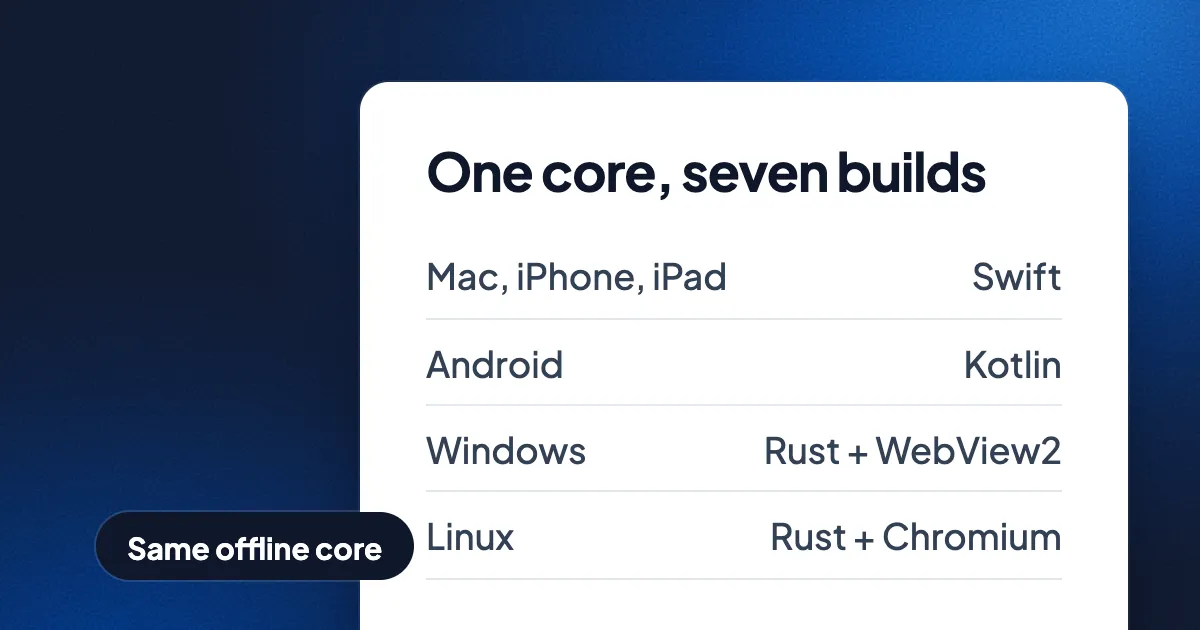
Short answer: Eddocu runs on Mac, Windows, Linux, iPhone, iPad, Android and the web from one offline core, written mostly in Rust, and one interface, written in TypeScript. Each operating system gets a thin native shell (Swift, Kotlin, or Rust around a system WebView or a bundled Chromium) that does only what the system has to do: files, windows, the camera, sign-in, purchases. One build switch picks the platform, and one schema file defines every message between the page, the shell and the core. Eddocu is the document editor we make; it is free for personal use, with no ads.
Seven builds from one switch
Eddocu's build has one platform switch with seven values: web, iOS (iPhone and iPad), Android, macOS, the Mac App Store build, Windows and Linux. Six of them are native apps. The seventh is the website, where the browser is the shell and our server runs the engines.
| Build | Shell | Draws the interface with | Offline core on the device |
|---|---|---|---|
| Mac (eddocu.com and Mac App Store) | Swift, AppKit | WKWebView | Yes |
| iPhone and iPad | Swift | WKWebView | Yes |
| Android | Kotlin | Android System WebView | Yes |
| Windows 10 and 11 | Rust | WebView2 | Yes |
| Linux | Rust | Chromium, bundled (CEF) | Yes |
| Web | The browser | The browser | No, the engines run on our server |
The size of each part says how it is split. As of 9 November 2026, the Rust code was about 203,000 lines and the TypeScript about 865,000 lines, while the Swift and Kotlin around the core came to about 43,000 lines together (counted in Eddocu in numbers). The shells are small on purpose.
The offline core does the document work
The offline core reads PDF, DOCX and PPTX into one document model of our own: pages, text runs with their fonts, pictures and shapes. Layout, search, text recognition and export to PDF, DOCX, PPTX and HTML live in the same core. The editor only ever sees that one model, so editing a paragraph in a PDF and in a slide is the same code. The longer story is in why we built our own document engine.
The core compiles for every platform, and the phone runs the same core as the desktop, not a lighter copy. On Android the core is a native library the app loads. In every app, the page reaches the core at the app's own address under /edc/, and the shell passes those requests to it. A file opened in an app is read and edited on the device, with no upload and no account.
One rule keeps the shells thin: work that is not specific to one operating system goes into the core once, never into one copy per shell. Parsing a file is the clearest case. The apps carry no document parsers written in JavaScript; when the page needs a file read, it asks the core. The website keeps its own JavaScript path for the same job, behind the same interface.
The interface is one web app, served locally
The library, the editor and the AI chat are one TypeScript code base with no UI framework. Each app carries that interface inside its package and serves it from a loopback address on the device, so pages paint without fetching the website. The app's calls to our backend go through the same local address, so the interface code looks the same in every app and ships no server URL of its own.
Why a WebView instead of a native interface per platform? Because one interface means a fix lands once and reaches every device in the next release. The WebView choice per platform is about graphics and consistency: Windows has WebView2, which is Chromium; on Linux we bundle Chromium through CEF so the app behaves the same on every distribution and draws on the GPU, at the cost of a larger download.
Platform adapters: differences live in one place
Shared code never asks "am I on iOS?". Every difference between platforms is an adapter, imported by a name such as @platform/scanner or @platform/purchases. The build maps each name to one file for the platform it is building. Some examples:
- Purchases: iOS sells App Store subscriptions, Android sells Google Play subscriptions, the other builds use the web checkout.
- Sign-in: the apps open the operating system's sign-in sheet; iOS adds Sign in with Apple.
- Scanning: iOS uses the system document camera; Linux takes image files, because it has no system scanner dialog.
- Text recognition: the apps use the operating system's recognizer where there is one; Linux has none, so the app downloads a recognizer on first use.
- Hover: the website and the Mac app have hover and tooltips; the iPhone, iPad and Android builds carry no hover code at all.
Each adapter states its flags as plain true or false values, and the build folds them while it links. A feature gated off for a platform is not in that platform's build at all: no hidden button, no dead module. Checks run on every change: every adapter must offer the same exports as the web version, shared code may not read the platform switch or talk to the native bridge directly, and each platform's bundle must carry its own adapters and none of another's.
The wire: one schema, four languages
The page, the shells and the core talk all the time: open this file, a sync finished, the keyboard appeared, here is a page picture. All of those messages are defined in one schema file. Every message is an array read by position, and no message carries a field name. The names exist only in the schema.
A generator turns the schema into index constants for TypeScript, Rust, Swift and Kotlin, so all four sides read the same slot by the same number. Commands and events have fixed numbers, and a retired number is never given to another command. Changing the order of a message raises the wire's revision number. The page, the shell and the core ship together in one app, so in a release they always speak the same revision.
What differs, honestly
- The website needs a connection and a sign-in; the apps open and edit offline with no account.
- Coding agents, your own API keys and your own MCP servers need a computer: the Mac app from eddocu.com, Windows or Linux. They run as programs on your machine. See our post on the AI chat.
- The phone and store apps start small: a release carries the offline core, sign-in, the library and the editor's offline path; other features download the first time you use them and stay for offline use.
- Tearing a tab off into its own window works in the Windows and Mac apps, not yet on Linux.
What it costs us
One core and one interface mean a bug is everyone's bug until it is fixed, and a fix has to hold on six operating systems and the web at once. The Linux app is about 100 MB larger because it carries Chromium, and Chromium's security releases become Eddocu releases. We think that is the right trade: one editor that behaves the same on every device you own.
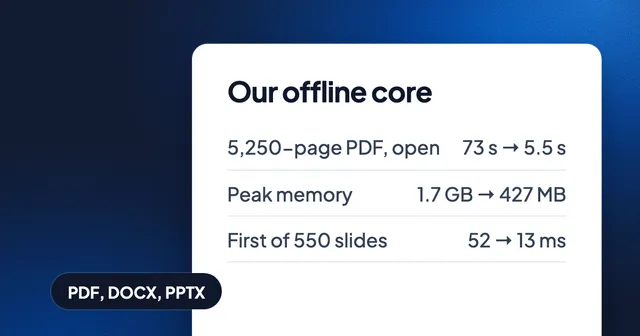
Speed comes from the same ownership. Measured on 1 November 2026 on a MacBook Pro (M3 Pro), one round of core work took a 5,250-page PDF from 73 seconds to about 5.5 seconds to fully open, and the first slide of a 550-slide deck from 52 ms to 13 ms. Because every app runs the same core, that work reached every platform in the next release. Details in how huge documents open fast.
FAQ
Is Eddocu a web app wrapped as a desktop app?
The interface is a web app, served from inside the app package. The document work is not: the offline core runs natively on the device, and the shell is native code for each system. The apps open and edit files offline.
Does the phone app run the same engine as the desktop?
Yes. iPhone, iPad and Android run the same offline core as Mac, Windows and Linux, so a document looks the same on each.
Why Chromium on Linux instead of the system WebView?
Chromium's GPU path is the most developed on Linux, it matches the Windows app, and its version is the one the package carries on every distribution. The cost is a larger download.
Does the website have the offline core?
No. The website runs the same engines on our server, so a document converts the same way wherever it was opened, but it needs a connection.
Get the apps for every platform at eddocu.com/download. Free for personal use, no ads; paid plans add AI and cloud sync (pricing).
Code sizes counted on 9 November 2026; speed measured on 1 November 2026 on a MacBook Pro (M3 Pro). Facts checked on 16 November 2026.