How to Edit a PDF Without Adobe Acrobat (Free and Paid Options, 2026)
What Acrobat Reader, Preview, Edge, Word, LibreOffice Draw and Eddocu can edit, what each costs, and how to change the existing text of a PDF without paying for Acrobat.
Updated 5 min read
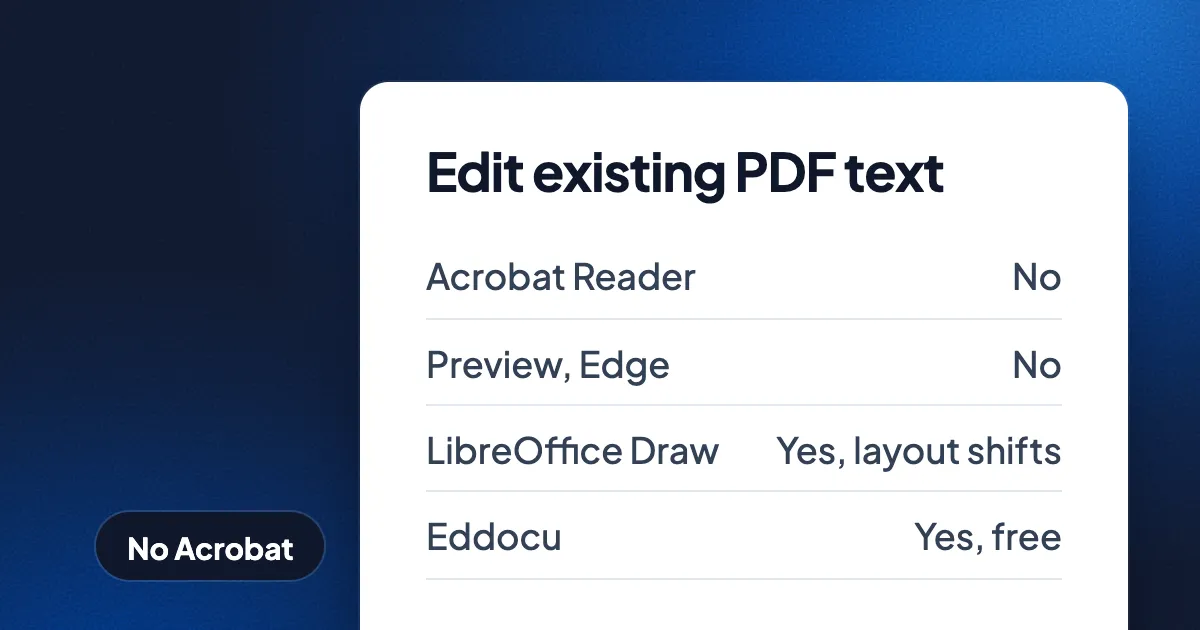
Short answer: you can edit a PDF without Adobe Acrobat for free. To change the existing text, use a desktop editor such as Eddocu (free for personal use on Mac, Windows, Linux, iPhone, iPad and Android) or LibreOffice Draw (free, layout often shifts). To annotate, sign or reorder pages, the tools you already have are enough: Preview on the Mac and Microsoft Edge on Windows. Acrobat Standard costs $179.88 a year and is still the better pick for forms, redaction and certificate-based signatures.
Eddocu is the editor we make, so read our row with that in mind. Every tool below is listed with what it can and cannot do, and the last section says where Acrobat and the others are better.
First, what kind of edit do you need?
"Edit a PDF" means four different jobs, and the free tools differ most on the last one.
- Annotate: highlight, draw, add notes and text boxes on top of the page.
- Sign: place a drawn or typed signature on the page.
- Organize: reorder, delete, add or merge pages.
- Edit the existing text: click into a sentence that is already on the page and change it, in its own font. This is the job Acrobat Reader cannot do, and the one Adobe charges for.
What each tool can edit
| Tool | Price for one person | Annotate and sign | Reorder pages | Edit existing text | File stays on your device |
|---|---|---|---|---|---|
| Adobe Acrobat Reader | Free | Yes | No | No | Yes |
| Adobe Acrobat Standard | $14.99 a month, annual plan ($179.88 a year) | Yes | Yes | Yes | Yes |
| Adobe Acrobat Pro | $19.99 a month, annual plan ($239.88 a year) | Yes | Yes | Yes | Yes |
| Preview (Mac) | Free, built in | Yes | Yes | No | Yes |
| Microsoft Edge (Windows) | Free, built in | Yes | No | No | Yes |
| Microsoft Word | Microsoft 365 Personal, $99.99 a year | No | No | Converts the PDF into a Word document; layout often changes | Yes |
| LibreOffice Draw | Free | Yes | Yes | Yes, layout often shifts | Yes |
| Eddocu | Free for personal use; Pro $49.99 a year | Yes, drawn signatures | Yes | Yes | Yes, in the apps |
Acrobat and Microsoft 365 prices are US list prices before tax, from our document software prices for 2026. Upload rules for the PDF websites are in how long online PDF tools keep your files.
The free options, one by one
Preview on the Mac
Preview comes with every Mac. Preview highlights, adds text boxes and shapes, signs, and reorders or deletes pages in the thumbnail sidebar. Preview cannot change the words that are already on the page. For a form you only need to fill in and sign, Preview is often all you need.
Microsoft Edge on Windows
Edge opens PDFs by default on Windows. Edge highlights, draws and adds text on top of the page. Edge cannot reorder pages or edit the existing text, and Windows has no built-in tool that joins PDF files.
LibreOffice Draw
LibreOffice is free and open source on Windows, Mac and Linux. Draw opens a PDF and lets you edit its text, one line at a time. The layout often shifts, because Draw rebuilds the page from separate lines and shapes. LibreOffice Draw is a good free choice for a short fix on a simple page.
PDF websites such as Smallpdf and iLovePDF
Smallpdf and iLovePDF run in any browser and are quick for merging, compressing or converting. Both upload your file to their servers: Smallpdf deletes it within 1 hour for most tools, iLovePDF within 2 hours. Their free tiers limit how much you can do. They are fine for a public flyer, less so for a contract or a payslip.
Eddocu
Eddocu is a document editor for PDF, DOCX and PPTX. Eddocu's apps for Mac, Windows, Linux, iPhone, iPad and Android open a PDF and edit its existing text, images and pages on your device, offline, with no account. Eddocu is free for personal use and shows no ads; the paid plans add AI and cloud sync. Eddocu also edits PDFs on the web, on its free plan.
How to edit PDF text without Acrobat, in Eddocu
- Install the app. Download it from eddocu.com/download: a
.dmgfor macOS 13 and later, an installer for Windows, or a.debfor Ubuntu 22.04 and later. On iPhone, iPad and Android, get it from the App Store or Google Play. - Open the PDF. Drag it onto the window, or use Open a file. It opens for reading.
- Start editing. Pick the text tool, then click into the sentence you want to change and type. You change the PDF's own text, in its own font, not a box laid on top. On a phone, switch from Viewing to Editing first.
- Fix the pages. Move or replace images, add or delete pages, and reorder them in the slides panel.
- Export. Open the menu, choose Export and keep PDF. Pick DOCX or PPTX instead if the next person needs to keep editing; see PDF to Word and back.
The file stays on your disk the whole time. Step-by-step guides for each device: edit a PDF offline, edit a PDF on iPhone and free PDF editors for Linux.
Limits to know before you start
- Fonts. A PDF often carries only the letters it already uses from a font. Eddocu fetches document fonts in the background while you are online; offline, an unusual font may be replaced by a close match.
- Scans are pictures. A scanned page has no text to edit until text recognition reads it. Eddocu reads scans on your device. Check names and numbers afterwards.
- Complex PDFs. Eddocu reads a PDF into its own editable format, so a complex page can come out slightly different. Check the export before you send it.
Where Acrobat and other tools are better
- Acrobat for PDF forms, redaction, compliance and formal e-signature workflows. Eddocu has no redaction tool yet.
- Certificate-based digital signatures. Eddocu signatures are drawn, like signing on paper. Use Acrobat, or Okular on Linux, when a document needs a certificate.
- Preview and Edge are already installed. For highlighting and signing they are the fastest choice, with nothing to download.
- Microsoft Word if you need track changes and mail merge exactly as Word does them.
Plans and prices are on the pricing page, and everything Eddocu does is on the features page.
FAQ
Can I edit a PDF without Adobe Acrobat for free?
Yes. Eddocu edits the existing text of a PDF for free for personal use, and LibreOffice Draw does it for free with some layout loss. Preview and Edge annotate and sign for free but do not change existing text.
Can Acrobat Reader edit text in a PDF?
No. Acrobat Reader views, comments and signs. Editing existing text starts at Acrobat Standard, $179.88 a year in US list prices.
Can I edit a PDF on a Mac without Acrobat?
Yes. Preview annotates, signs and reorders pages. To change the existing text, use Eddocu for Mac or LibreOffice Draw.
Is there a PDF editor without a subscription?
Yes. Eddocu is free for personal use with no time limit and no ads, and LibreOffice is free and open source. Eddocu's paid plans are only for AI and cloud sync.
Facts checked on 16 November 2026. Prices are US list prices from adobe.com, microsoft.com and eddocu.com/pricing, as given in our prices for 2026 post.