How Long Online PDF Tools Keep Your Files: Smallpdf, iLovePDF, Adobe, Sejda and More
From 20 minutes to 24 hours, or until you delete it: how long eight PDF websites keep an upload, where they process it, whether they train AI on it, and how to skip the upload.
Published Updated Reading time 3 min read
On this page
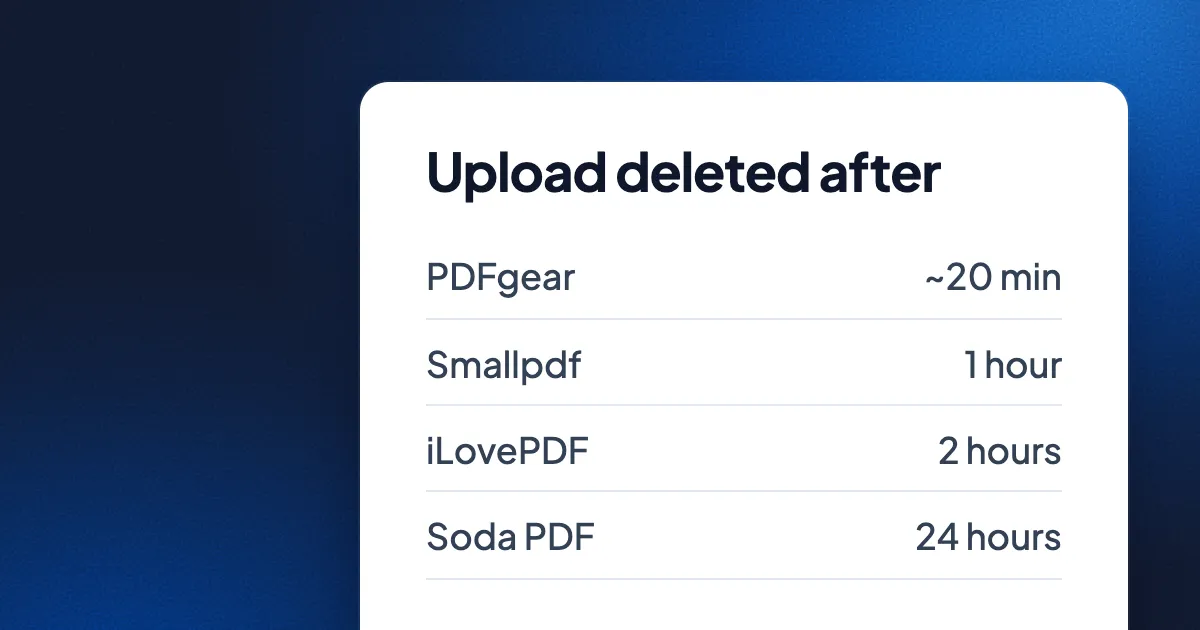
Short answer: most free PDF websites upload your file to their servers and delete it later: PDFgear after about 20 minutes, Smallpdf and PDF24 within 1 hour, iLovePDF and Sejda within 2 hours, Soda PDF within 24 hours. Adobe and Canva give no number for files you keep in an account. Canva may use uploads to train its AI unless you turn that off; Smallpdf, iLovePDF, Adobe and Sejda say they don't. To keep a file off any server, use a tool that works on your device, such as Eddocu's in-browser Merge PDF or its apps.
How long each site keeps your file
From each company's own help, tool and privacy pages, as they read on 14 November 2026. "Not stated" means we could not find it on their pages.
| Tool | Deleted after | Where files are processed | Used to train AI? | Free limits |
|---|---|---|---|---|
| Smallpdf | 1 hour, for most tools | EU servers; Cloudflare in the US or EU for US users | No, for its AI tools | Daily download limit, number not stated |
| iLovePDF | 2 hours; signed documents up to 5 years | European Economic Area by default | No | 1 file per task on most tools, 25 for merge; 15 to 200 MB per task by tool |
| Adobe Acrobat online | "A short time", no number; kept if you sign in and save | Adobe servers, region not stated on the tool pages | No | One free task without signing in |
| Sejda | 2 hours; shared links 7 days | DigitalOcean and Google Cloud, US and Europe | No | 3 tasks an hour, 50 MB or 200 pages per file |
| PDF24 Tools | 1 hour | EU data centres; its AI invoice tool may use the US | Not stated | No limit stated |
| Soda PDF online | 24 hours | Not stated | Not stated | 2 files a day, 3 MB each |
| PDFgear online | About 20 minutes after you leave, per its tool pages | Amazon servers in the US | Not stated | 100 MB per file |
| Canva | Kept with your account until you delete it | US, Australia, Singapore, EU, UK, Philippines, New Zealand | Yes, unless you change your privacy settings | Canva Free, 5 GB |
| Eddocu Merge PDF | Never uploaded | In your browser, on your device | No | Up to 100 files, no account |
PDFgear's pages also say files are deleted on download and when you close the browser, so the 20 minutes is the longest it says. Smallpdf and iLovePDF state ISO 27001 certification; the others list different or no certifications on the pages we checked.
What "deleted after 1 hour" does and doesn't mean
- The file was still uploaded. For that hour it sits on a company's server, in a country you may not have chosen, under that company's security.
- Signing in usually changes the clock. Smallpdf, Adobe and Canva keep files you save to an account until you delete them.
- Shared and signed files live longer. Sejda keeps shared links for 7 days; iLovePDF keeps signed documents for up to 5 years.
- AI features can have their own rules. PDF24's AI invoice tool sends files to Google's Gemini, which may process them in the US. Read the AI section of a privacy policy, not only the deletion promise.
How to work on a PDF without uploading it
- In your browser, on your device: Eddocu's Merge PDF reads and joins up to 100 PDFs inside your browser, with no account. Nothing is sent anywhere; see how it works.
- In an app: Eddocu for Mac, Windows, Linux, iPhone, iPad and Android edits the text of a PDF and merges files on the device, offline. See how to edit a PDF offline.
- What your computer already has: Preview on the Mac annotates, signs and reorders pages; Microsoft Edge annotates on Windows. Neither changes the existing text.
- The sites' own desktop apps: Sejda Desktop and the PDF24 Creator keep files on your computer.
FAQ
Is it safe to upload a contract to a free PDF website?
Most of the big sites encrypt the upload and delete the file within hours, and that is enough for many files. For contracts, medical or financial papers, or anything under an NDA, use a tool that never uploads the file.
Which PDF website deletes files fastest?
Among the ones we checked, PDFgear says about 20 minutes after you leave, then Smallpdf and PDF24 at 1 hour. A tool that runs on your device never has the file to delete.
Does Canva train AI on my PDFs?
Canva's privacy policy says it may use media uploads to train its AI unless you change your privacy settings. Education accounts are excluded.
Facts checked on 14 November 2026 on smallpdf.com, ilovepdf.com, adobe.com, sejda.com, pdf24.org, sodapdf.com, pdfgear.com and canva.com. Policies change; tell us on the contact page if one has.
Related posts
The Best Document Editor for Teams in 2026
A comprehensive look at what makes a great team document editor and why web-native tools are the future.
Guide 5 min read
How to Convert PDF to an Editable Document
Step-by-step guide to converting PDFs into fully editable documents without losing formatting.
Guide 2 min read
AI Document Editing: A Complete Guide
How AI is transforming document creation, from content generation to smart formatting and intelligent search.
Guide 5 min read