Eddocu vs ABBYY FineReader PDF: an everyday editor, or an OCR and conversion specialist
Short answer
ABBYY FineReader PDF is built around OCR: it reads scans in 198 languages, turns them into editable Office files, and its Corporate edition compares a Word file against a scanned copy. It is sold only by subscription, from $99 a year for Standard on Windows and $69 a year on Mac. Eddocu is free for personal use, edits PDFs, Word documents and decks on every platform, and makes scans searchable with OCR on the device. FineReader earns its price when paper has to become accurate digital text; for editing documents that are already digital, Eddocu’s free plan does the work.
Related tools: OCR PDFCompare PDFsPDF to WordPDF to ExcelDeskew PDF
Pick Eddocu if
- Your files are mostly digital PDFs, DOCX reports and PPTX decks, with the occasional scan to make searchable.
- You work on Linux or a phone as well as on Windows or a Mac.
- You would rather not pay a yearly subscription to edit PDFs for yourself.
Pick ABBYY FineReader PDF if
- You convert stacks of paper, faxes or photographed pages into Word and Excel files and need the text to come out right.
- Your documents are in many languages, including scripts most OCR engines handle poorly.
- You check a signed scan against the Word draft it came from, line by line.
Feature by feature
| Feature | Eddocu | ABBYY FineReader PDF |
|---|---|---|
| Platforms | Yes Windows, Mac, Linux, iPhone, iPad, Android and the web | Partly Windows 10 and 11 (Standard, Corporate) and a separate Mac edition with fewer tools; a FineReader app for iOS; no Linux |
| Works offline | Partly Yes in the apps on every platform; the web version needs a connection | Partly OCR and editing run on the computer; every subscription needs product registration |
| Opens | Yes PDF, DOCX, PPTX; Pages and Keynote files on Mac and Linux | Yes PDF, scans and image files; creates PDFs from Office files and SVG |
| Saves as | Yes PDF, DOCX, PPTX, HTML | Yes PDF, PDF/A and PDF/UA; converts PDFs and scans to Word, Excel and other editable formats |
| Edit an existing PDF | Yes Edit the text, images and pages of an existing PDF | Yes Rewrites paragraphs, edits tables and organises pages on Windows; the Mac edition has a smaller PDF toolset |
| Sign documents | Yes Draw, type or upload a signature, ask others to sign, or sign with a .p12 certificate; the signing tools are in beta | Partly Digital signatures among the protection tools, beside redaction and passwords; no requests for others to sign |
| AI | Yes Chat that drafts, rewrites and translates in the page; 100 credits a month free, more from $9.99 a month | Partly AI-based OCR; no assistant that drafts or rewrites text on its product pages |
| Price | Yes Free for personal use, no ads; Pro $9.99 a month or $49.99 a year | Partly US store: Standard $99, Corporate $165 a year on Windows; Mac $69 a year; 7-day trial; no perpetual licence |
| Account needed | Partly Not to edit in the apps; a free account for the web version, cloud sync, sharing and AI | Partly Product registration for every subscription; Mac renewals need a new licence key |
| Open source | No No, proprietary | No No, proprietary |
What is different in practice
198 OCR languages and rebuilt layouts
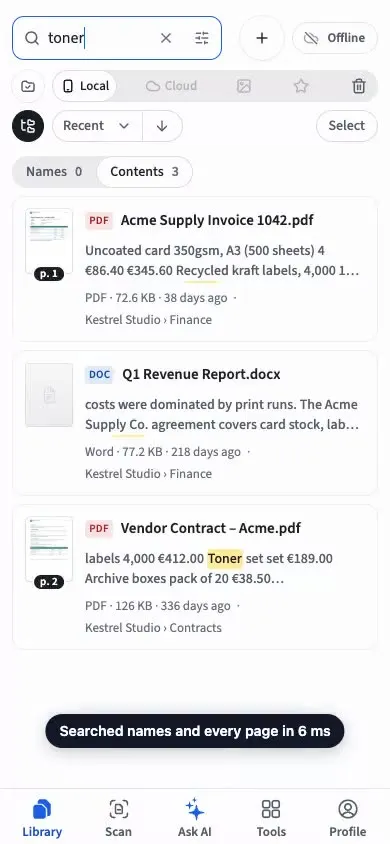
FineReader recognises text in 198 languages and rebuilds a scanned page as an editable document with its columns and tables intact. Eddocu’s OCR tool makes a scanned PDF searchable and its text selectable on the device; it is there to find and copy words in a scan, not to turn a hundred photographed pages into a clean Word file.
Comparing a Word draft with the signed scan
FineReader PDF Corporate compares two versions even when one is a Word file and the other a scanned PDF, in 40 languages, and writes the result as a Word file with Track Changes, a PDF with a comment on each change, or a table of differences. Eddocu’s Compare PDFs tool marks the differences between two PDFs on their pages, which covers two versions of the same PDF but not a DOCX against a scan.
Editing the DOCX instead of converting to it
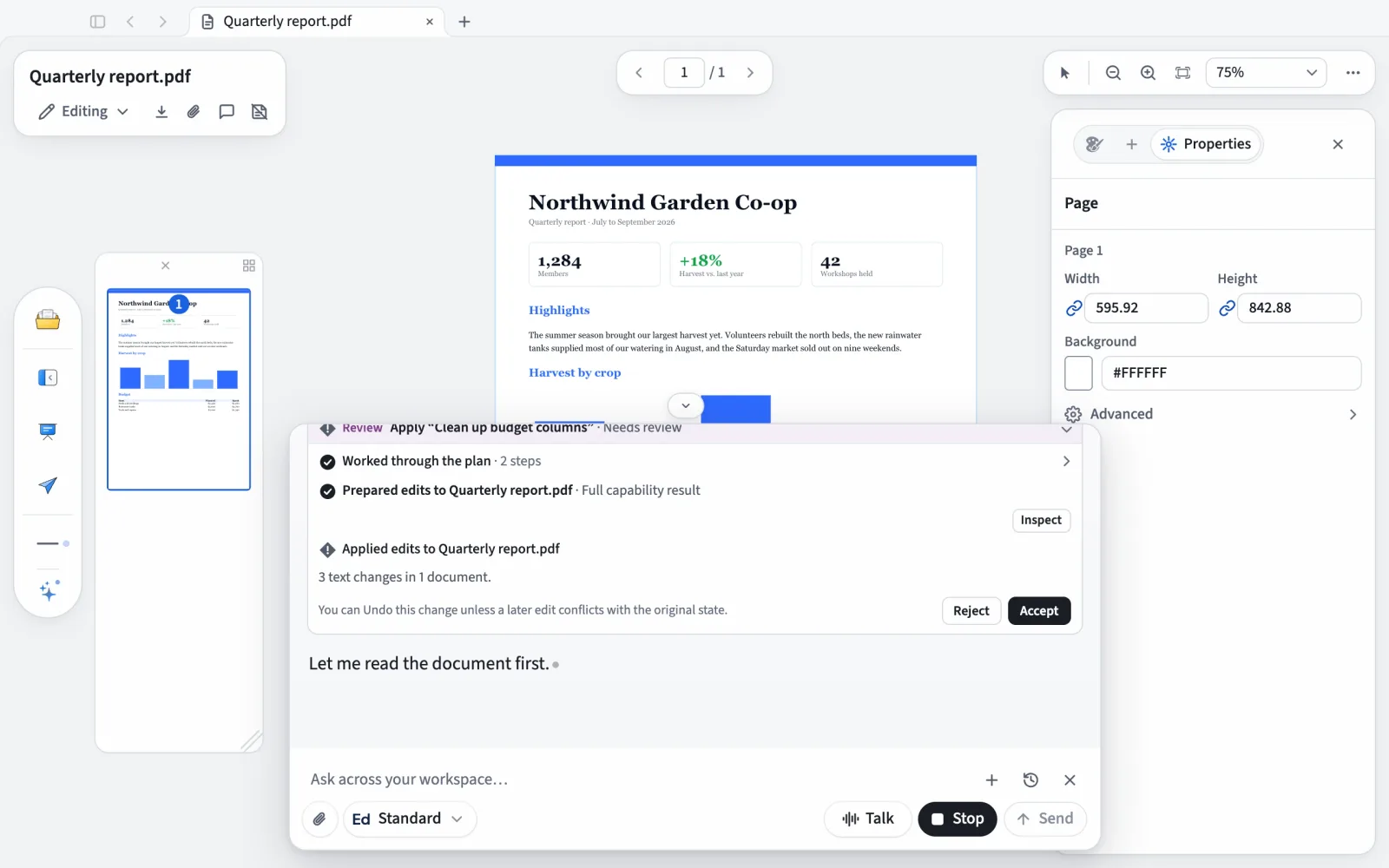
FineReader’s route to an editable document is conversion: the PDF becomes a Word or Excel file that you finish in Office. Eddocu opens DOCX and PPTX files in the same editor as PDFs, so the converted report can be corrected, rewritten with the AI chat and saved again without a second program.
Two desktop editions, against one plan everywhere
ABBYY sells FineReader for Windows and FineReader for Mac as separate subscriptions with different features: document comparison and the Hot Folder are Windows Corporate tools, and there is no Linux version. Eddocu has one free plan and one Pro plan for Windows, Mac, Linux, iPhone, iPad, Android and the web, and its phone apps open and search PDFs and Word files offline.
Where Eddocu falls short
- Eddocu imports a PDF, DOCX or PPTX into its own format and writes a new file when you save. Simple documents come back as they went in; complex layouts (dense multi-column pages, unusual fonts, embedded charts) can shift, so check the result before you send it.
- Eddocu is closed source: you cannot read its code, audit it or host it on your own server.
- Filling and adding PDF form fields happens in separate tools that are still in beta.
- The web version needs an internet connection and a free account. Offline editing without an account is in the apps for Windows, Mac, Linux, iPhone, iPad and Android.
- Eddocu’s Compare PDFs tool takes two PDFs; it cannot compare a Word file with a scanned copy or save the differences as Track Changes.
- Eddocu has no watched folder that runs OCR on new scans automatically, like the Hot Folder in FineReader PDF Corporate.
Questions people ask
Can I buy ABBYY FineReader PDF once instead of subscribing?
Not on ABBYY’s store today. FineReader PDF for Windows is sold by the month, the year or three years, and the Mac edition by the year or three years; ABBYY’s pricing page offers no perpetual licence. Eddocu’s free plan has no time limit, and Pro is $9.99 a month or $49.99 a year.
Does FineReader PDF for Mac compare documents?
ABBYY lists Compare Documents under FineReader PDF Corporate for Windows. The Mac edition focuses on OCR and conversion, reads 198 languages and runs on macOS 12 or later, but its PDF toolset is smaller than the Windows one.
Can Eddocu make a scanned PDF searchable?
Yes. Eddocu’s OCR adds a text layer to a scanned PDF on your device, so you can search, select and copy its words. For accurate conversion of large scanned archives into Word and Excel, especially in less common languages, FineReader is the stronger tool.
Which costs less for a small office?
FineReader PDF Standard is $99 a user a year and Corporate, which adds comparison and the Hot Folder, $165; ABBYY sells volume licences from five seats through sales. Eddocu is free for personal use, so for an office the question is whether you need ABBYY’s OCR accuracy or mainly an editor for everyday PDFs and Office files.
More comparisons
- Eddocu vs Adobe Acrobat
- Eddocu vs Stirling PDF
- Eddocu vs Foxit PDF Editor
- Eddocu vs Smallpdf
- Eddocu vs iLovePDF
- Eddocu vs PDFgear
- Eddocu vs Wondershare PDFelement
- Eddocu vs Sejda
- Eddocu vs PDF24
- Eddocu vs Xodo
- Eddocu vs Nitro PDF
- Eddocu vs PDF Expert
- Eddocu vs Apple Preview
- Eddocu vs Ikinari PDF
- Eddocu vs Bluebeam Revu
- Eddocu vs Okular
- Eddocu vs Docusign
- Eddocu vs Dropbox Sign
- Eddocu vs Adobe Acrobat Sign
- Eddocu vs Microsoft Word
- Eddocu vs Google Docs and Slides
- Eddocu vs Apple Pages
- Eddocu vs Ichitaro
- Eddocu vs Tencent Docs
- Eddocu vs Zoho Writer
- Eddocu vs Microsoft PowerPoint
- Eddocu vs Apple Keynote
- Eddocu vs Canva
- Eddocu vs Gamma
- Eddocu vs Microsoft Office
- Eddocu vs LibreOffice
- Eddocu vs ONLYOFFICE
- Eddocu vs WPS Office
- Eddocu vs Hancom Office
- Eddocu vs Feishu Docs
- Eddocu vs Polaris Office
- Eddocu vs SoftMaker Office
- Eddocu vs Notion
- Eddocu vs Evernote