Eddocu vs Tencent Docs: your own files on every device, or China’s shared online documents
Short answer
Tencent Docs is an online document service for teams, with apps on every major platform and inside WeChat and QQ, free with 1 GB and ¥158 a year for Super Member. Eddocu edits PDF, Word and PowerPoint files on your device, offline in its apps, free for personal use. Pick Tencent Docs when your team shares documents through WeChat or QQ; pick Eddocu to edit files you keep yourself, PDFs included.
Related tools: Edit PDFPDF to WordCompress PDFMerge PDF
Pick Eddocu if
- You keep your documents as files on your own device and edit them offline.
- You edit PDF text and pages without a membership.
- You want one AI chat with a free monthly allowance rather than credits earned through tasks.
Pick Tencent Docs if
- Your team edits the same document together and shares it through WeChat or QQ.
- You want WeChat and QQ mini programs, not just apps.
- You need large cloud storage cheaply: 380 GB for ¥158 a year.
Feature by feature
| Feature | Eddocu | Tencent Docs |
|---|---|---|
| Platforms | Yes Windows, Mac, Linux, iPhone, iPad, Android and the web | Yes Web, Windows, Mac (Apple silicon), Linux, iPhone, iPad, Android, WeChat and QQ mini programs |
| Works offline | Partly Yes in the apps on every platform; the web version needs a connection | Partly Built for online documents; the official pages do not describe offline editing |
| Opens | Yes PDF, DOCX, PPTX; Pages and Keynote files on Mac and Linux | Yes Word, Excel and PowerPoint files, converted into online documents; PDF tools for members |
| Saves as | Yes PDF, DOCX, PPTX, HTML | Partly Converts back to Word, Excel and PowerPoint; owners can block others from exporting |
| Edit an existing PDF | Yes Edit the text, images and pages of an existing PDF | Partly PDF text and image editing, page adjustment and unlimited conversion with Super Member |
| Sign documents | Yes Draw, type or upload a signature, ask others to sign, or sign with a .p12 certificate; the signing tools are in beta | No No signing tool in its plan benefits |
| AI | Yes Chat that drafts, rewrites and translates in the page; 100 credits a month free, more from $9.99 a month | Partly AI credits: from limited-time tasks on the free plan, 500 a month with Super Member, 1,200 with Plus |
| Price | Yes Free for personal use, no ads; Pro $9.99 a month or $49.99 a year | Partly Free with 1 GB; Super Member ¥13.2 a month or ¥158 a year; Plus ¥24.8 or ¥298 |
| Account needed | Partly Not to edit in the apps; a free account for the web version, cloud sync, sharing and AI | No A sign-in for every document |
| Open source | No No, proprietary | No No, proprietary |
What is different in practice
Online documents or files you keep
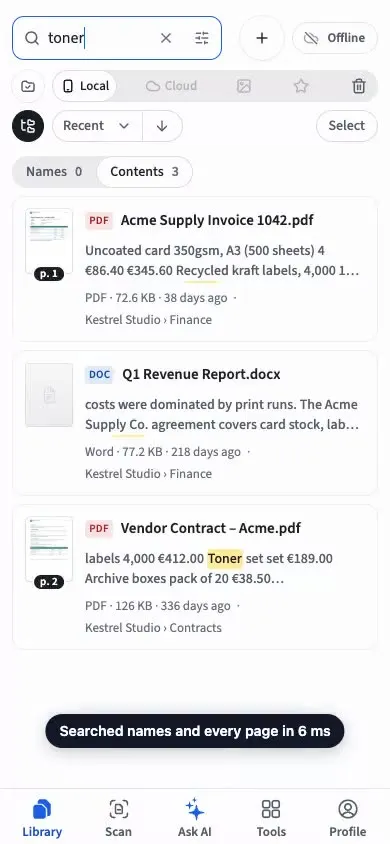
Tencent Docs turns a Word or PowerPoint file into an online document that lives in its cloud and converts it back when you need a file. Eddocu edits the PDF, DOCX or PPTX on your device, offline in its apps, and one search finds words inside every file there.
PDF editing behind the membership
Text and image editing of PDFs, page adjustment and unlimited format conversion are listed as Super Member benefits, at ¥13.2 a month or ¥158 a year. Eddocu edits the text, images and pages of a PDF on its free plan.
How AI is counted
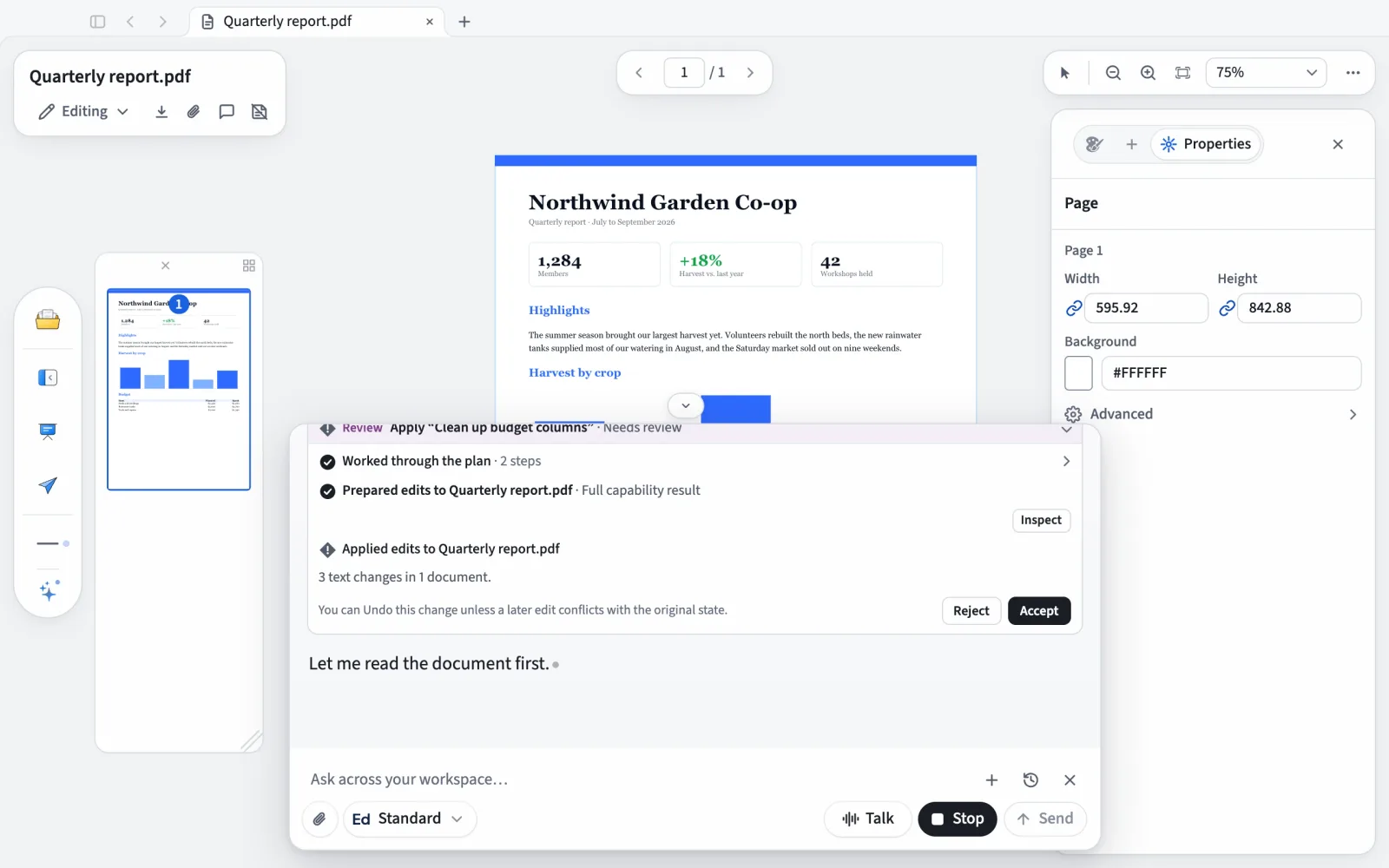
Free accounts earn Tencent Docs AI credits through limited-time tasks; Super Member gives 500 a month and Plus 1,200. Eddocu’s free plan has 100 AI credits every month, and its chat proposes changes in the page for you to accept or reject.
Where Tencent Docs is clearly ahead
Sharing in China: documents open inside WeChat and QQ, colleagues edit one copy together, and Super Member brings 380 GB and a 90-day recycle bin for ¥158 a year. Teams that coordinate through WeChat will find it hard to beat, and Eddocu has no shared editing like it.
Where Eddocu falls short
- Eddocu imports a PDF, DOCX or PPTX into its own format and writes a new file when you save. Simple documents come back as they went in; complex layouts (dense multi-column pages, unusual fonts, embedded charts) can shift, so check the result before you send it.
- Eddocu is closed source: you cannot read its code, audit it or host it on your own server.
- Filling and adding PDF form fields happens in separate tools that are still in beta.
- The web version needs an internet connection and a free account. Offline editing without an account is in the apps for Windows, Mac, Linux, iPhone, iPad and Android.
- Eddocu has no spreadsheet editor and no shared editing of one document by several people.
- Eddocu has no WeChat or QQ mini program.
Questions people ask
How much does Tencent Docs membership cost?
Tencent Docs is free with 1 GB. Super Member is ¥13.2 a month or ¥158 a year with 380 GB and 500 AI credits a month; Super Member Plus is ¥24.8 a month or ¥298 a year with 500 GB and 1,200 credits. Business plans are priced per user.
Can Tencent Docs edit PDFs?
Yes, with a membership: Super Member lists PDF text and image editing, page adjustment and unlimited conversion among its benefits. Eddocu edits PDF text, images and pages on the free plan.
Which platforms does Tencent Docs support?
The web, Windows, Mac (adapted for Apple silicon), Linux, iPhone and iPad, Android, and mini programs in WeChat and QQ. Eddocu has apps for Windows, Mac, Linux, iPhone, iPad and Android, plus the web.
More comparisons
- Eddocu vs Adobe Acrobat
- Eddocu vs Stirling PDF
- Eddocu vs Foxit PDF Editor
- Eddocu vs Smallpdf
- Eddocu vs iLovePDF
- Eddocu vs PDFgear
- Eddocu vs Wondershare PDFelement
- Eddocu vs Sejda
- Eddocu vs PDF24
- Eddocu vs Xodo
- Eddocu vs Nitro PDF
- Eddocu vs PDF Expert
- Eddocu vs Apple Preview
- Eddocu vs Ikinari PDF
- Eddocu vs ABBYY FineReader PDF
- Eddocu vs Bluebeam Revu
- Eddocu vs Okular
- Eddocu vs Docusign
- Eddocu vs Dropbox Sign
- Eddocu vs Adobe Acrobat Sign
- Eddocu vs Microsoft Word
- Eddocu vs Google Docs and Slides
- Eddocu vs Apple Pages
- Eddocu vs Ichitaro
- Eddocu vs Zoho Writer
- Eddocu vs Microsoft PowerPoint
- Eddocu vs Apple Keynote
- Eddocu vs Canva
- Eddocu vs Gamma
- Eddocu vs Microsoft Office
- Eddocu vs LibreOffice
- Eddocu vs ONLYOFFICE
- Eddocu vs WPS Office
- Eddocu vs Hancom Office
- Eddocu vs Feishu Docs
- Eddocu vs Polaris Office
- Eddocu vs SoftMaker Office
- Eddocu vs Notion
- Eddocu vs Evernote