How to Edit PowerPoint on an iPad Without Microsoft 365
PowerPoint edits for free only on screens of 10.1 inches or less, and every iPad but the mini is bigger. What each iPad measures, and the free ways to edit and save .pptx: Keynote, Google Slides and Eddocu.
Published Updated Reading time 3 min read
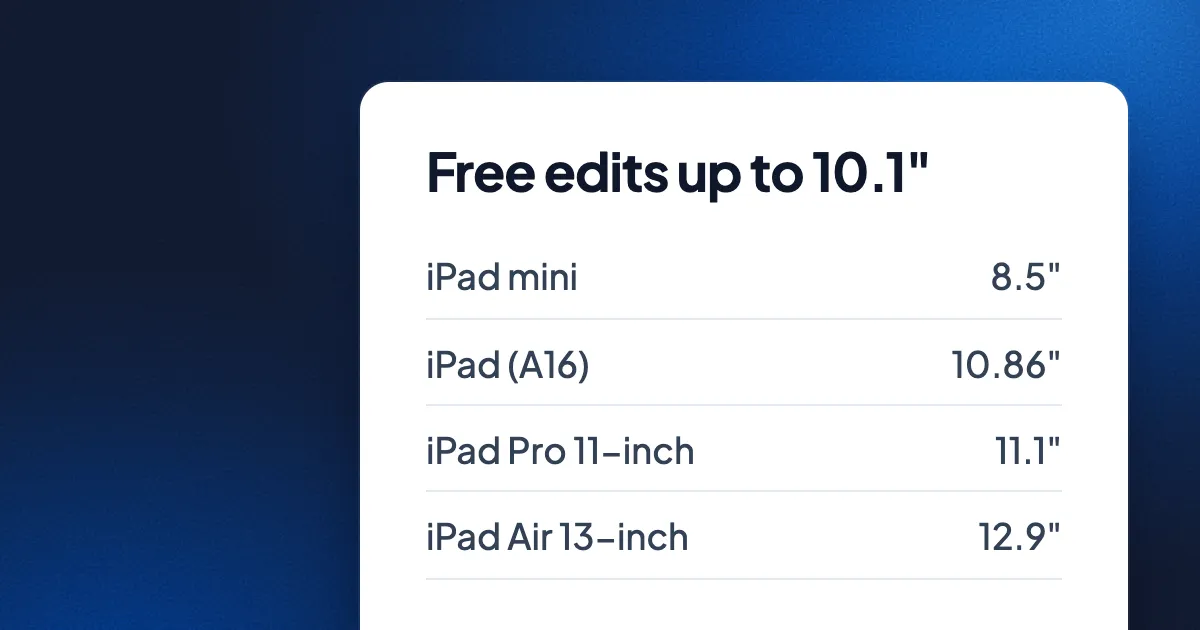
Short answer: Microsoft lets you edit in PowerPoint for free only on screens of 10.1 inches or less, and every current iPad except the iPad mini is bigger than that, including the "11-inch" iPad, which measures 10.86 inches. On those iPads you need Microsoft 365, from $99.99 a year, or a different app. Keynote and Google Slides are free and open and save .pptx files. Eddocu opens, edits and exports .pptx on the iPad offline, with no account.
Microsoft's 10.1-inch rule
Microsoft's support page for its mobile apps says core editing is free on iOS devices with screens of 10.1 inches or less. Above that, the Word, Excel and PowerPoint apps open files for viewing, and editing needs a Microsoft 365 subscription. The size is the screen's diagonal, so what counts is the measured size, not the name.
| iPad | Apple's name | Screen, measured diagonally | Free editing in PowerPoint? |
|---|---|---|---|
| iPad mini (A20 Pro) | 8.5-inch | 8.5 inches | Yes |
| iPad (A16) | 11-inch | 10.86 inches | No |
| iPad Air 11-inch (M4) | 11-inch | 10.86 inches | No |
| iPad Air 13-inch (M4) | 13-inch | 12.9 inches | No |
| iPad Pro 11-inch (M5) | 11-inch | 11.1 inches | No |
| iPad Pro 13-inch (M5) | 13-inch | 13 inches | No |
Sizes from Apple's own spec pages. Older iPads follow the same rule: look up the diagonal on Apple's spec page for your model.
Your options on a bigger iPad
| PowerPoint with Microsoft 365 | Keynote | Google Slides | Eddocu | |
|---|---|---|---|---|
| Price | $99.99 a year (Personal) or $129.99 (Family) | Free; optional Apple plans | Free | Free for personal use |
| Account to edit | Microsoft account | None to edit on the iPad | Google account | None |
| Opens .pptx | Yes | Yes | Yes | Yes |
| Saves as .pptx | Yes | Yes, by exporting | Yes, by exporting | Yes, by exporting (charts not yet) |
Microsoft 365
If you work with PowerPoint every day, Microsoft 365 Personal at $99.99 a year (or $9.99 a month) is the sure way to keep every animation, chart and font exactly as PowerPoint makes them. Microsoft 365 Basic, at $19.99 a year, lists the Office apps as free on the web, iOS and Android only; Microsoft does not say it unlocks editing on a large iPad, so check before you buy it for that.
Keynote
Apple's Keynote is free on the iPad. Apple's guide says it opens and edits PowerPoint presentations, and exports them back to .pptx for PowerPoint. The current version needs iPadOS 26. Keynote converts the deck into its own format while you edit, so check fonts and transitions after you export.
Google Slides
The Google Slides app opens and edits PPT and PPTX files and exports them as PPTX or PDF. It needs a Google account, and the file goes through your Google Drive.
Eddocu
Eddocu's iPad app opens a .pptx from Files or your library. Switch from Viewing to Editing, tap twice into a text box and type, then use Export to save it as PPTX, PDF or Word. Everything runs on the iPad, so it works offline and needs no account. Charts are not written into exported decks yet: each becomes a grey "Chart" box. The steps are the same as in editing a PowerPoint on Android.
Which to pick
- You present PowerPoint decks for work every week: Microsoft 365.
- You fix a few words before a meeting, often offline: Eddocu or Keynote.
- Your team already works in Google Drive: Google Slides.
- You have an iPad mini: PowerPoint's free editing works as it is.
FAQ
Why can't I edit in PowerPoint on my iPad for free?
Because the screen is larger than 10.1 inches. Microsoft offers free editing only on smaller screens; on larger ones the app opens files to view, and editing needs Microsoft 365.
Is the 11-inch iPad under the limit?
No. Apple's 11-inch iPad and iPad Air measure 10.86 inches diagonally, still over 10.1 inches.
Can I edit a PowerPoint on an iPad offline?
Yes, with Eddocu, which opens, edits and exports the deck on the iPad itself with no internet connection.
Facts checked on 14 November 2026 on support.microsoft.com, microsoft.com, apple.com, apps.apple.com, support.apple.com and support.google.com, and against Eddocu 1.3.20 for iPad.
Related posts
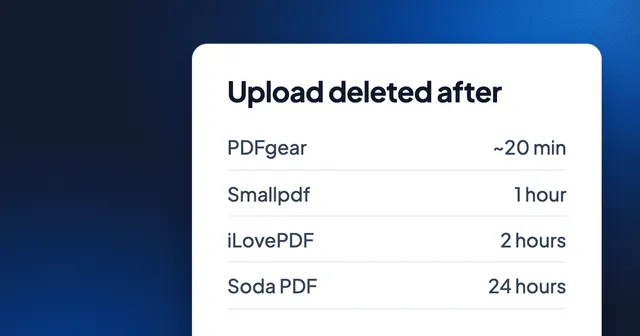
How Long Online PDF Tools Keep Your Files: Smallpdf, iLovePDF, Adobe, Sejda and More
From 20 minutes to 24 hours, or until you delete it: how long eight PDF websites keep an upload, where they process it, whether they train AI on it, and how to skip the upload.
Guide 3 min read
The Best Document Editor for Teams in 2026
A comprehensive look at what makes a great team document editor and why web-native tools are the future.
Guide 5 min read
How to Convert PDF to an Editable Document
Step-by-step guide to converting PDFs into fully editable documents without losing formatting.
Guide 2 min read